WiFi Network Monitor
Welcome to the home of WiFi Network Monitor, a cutting-edge software solution developed by the cybersecurity ... SecurityXploded. This powerful tool is designed to seamlessly scan your Windows 10 system for any active WiFi ...

Fing scans a local network to show connected devices and provides tools for checking network performance and connectivity. Its internet speed test helps assess a connection, while ping and traceroute support basic troubleshooting. It is useful for home users and IT staff investigating unfamiliar devices or connection problems.
| Author: | Fing Limited |
| License: | Shareware |
| Price: | $69.99 |
| Released: | Mar 9, 2026 |
| File size: | 101.00 MB |
| Downloads: | 404 |
| Keywords: | x64 Windows Software, network troubleshooting, Service discovery, scan, Command prompt, Network discovery, scanner, Internet Performance Tests, ping and traceroute, Network Security, Fing Limited, network scanner, Troubleshooting Tool, network info, internet speed test, Device Recognition, ethernet, network monitor, device discovery |
| Author URL: | https://www.fing.com/ |



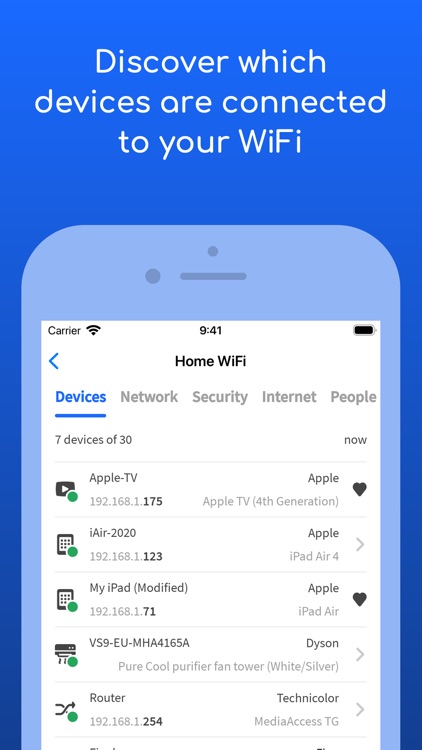


Fing is a network monitoring and troubleshooting program for people who want to see which devices are connected to a local network and check how that network is performing. Its network scanner presents connected equipment in one place, helping home users and administrators understand what is using the connection and spot devices they do not recognize.
The device list makes it easier to inspect a network than checking each computer, phone or smart device individually. A scan can reveal devices currently visible on the network, giving users a practical starting point when investigating unfamiliar connections or confirming that expected equipment is online. Fing also provides network monitoring tools for checking connectivity and diagnosing common access problems.
For performance checks, Fing includes an internet speed test, along with utilities such as ping and traceroute. A speed test helps users assess the connection's current performance, while ping can check whether a host responds and indicate its response time. Traceroute shows the route taken by network traffic toward a destination, which can help narrow down where a connection problem occurs. These tools support basic troubleshooting without requiring users to rely solely on command-line utilities.
Fing is useful in homes with multiple connected devices, as well as in small-office and IT support workflows where a quick view of network activity can help identify connectivity issues. Users can scan for connected devices, check whether an internet connection is responding as expected, and run diagnostic tests when a website, service or device is unreachable. The results can help distinguish a local network problem from an issue farther along the connection, though they do not replace specialist network analysis.
Fing is shareware and is available for Windows 10 and Windows 11. Its network scanning, monitoring and diagnostic tools are intended to make routine network checks more accessible, whether the goal is to review connected devices, test internet performance or investigate a connection that is behaving unexpectedly.