ForwardMail for Windows 10 - Full description
ForwardMail is a Windows utility for retrieving incoming email from multiple accounts and forwarding selected messages to other addresses. It is intended for people who need mail delivered from one mailbox to another, want different forwarding rules for different accounts, or need to adapt forwarded messages for mobile viewing. The program can manage up to 10 email accounts, with a check interval configured separately for each account.
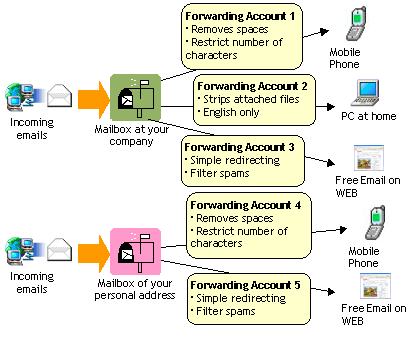
Forwarding can be directed to multiple addresses, and separate conditions can be applied when messages from the same mailbox need to go to different destinations. Custom filters narrow which messages are forwarded using details such as email address, sender, subject, message size, time zone, email client, headers, and other message information. This can keep routine forwarding focused on relevant mail instead of sending every incoming message onward. Redirect forwarding is supported, and incoming header information can be preserved so recipients can reply to the original sender using the forwarded message.
Message-processing options let users remove unnecessary attachments, specified text or strings, and quoted citation lines. ForwardMail can convert HTML email to plain text and split forwarding according to a specified message size. These controls are useful when forwarded mail needs to be smaller, easier to read on a basic device, or stripped of content that is not needed at the destination. Account settings can be managed with templates or a CSV file, which helps when maintaining multiple forwarding configurations.
A remote-control feature allows forwarding to be suspended or resumed by sending a special command email to an account. When it accepts a command, the program can send back an account status report. This provides a way to manage forwarding without opening the main settings interface, while the per-account schedule and filters determine how messages are checked and handled during normal use.
ForwardMail is distributed as demo software. Its stated Windows support includes Windows 10, as well as earlier Windows releases; Windows 11 support is not established here. The program is suited to users seeking configurable mailbox-to-mailbox forwarding rather than a full email client, with its filters and message cleanup settings governing what gets relayed and how it appears at the destination.