Official Signs Icons Bonus Collection
Welcome to the ultimate destination for Windows 10 enthusiasts seeking a remarkable software experience! Introducing the "Official Signs Icons Bonus Collection" by Grafile, a groundbreaking development that ...

IconPackager changes Windows icons through themed packages, letting users replace default system icons in one operation instead of updating them individually. It also supports changing icons for specific file types and recoloring packages. Built-in sets and downloadable packages provide options for creating a coordinated desktop appearance or making selected formats easier to identify. The trialware is developed by Stardock Systems.
| Author: | Stardock Systems |
| License: | Trialware |
| Price: | $12.99 |
| Released: | Jun 4, 2023 |
| File size: | 80.10 MB |
| Downloads: | 275 |
| Keywords: | desktop icon customization, skins, recolor icon packages, Stardock, Stardock Systems, desktops, icon theme packages, themes, icon customization, Windows 10, windows icon changer, user interface enhancement, stardock iconpackager, skinning, change file type icons, x64 software, IconPackager, icons, visual styles |
| Author URL: | https://www.stardock.com/ |
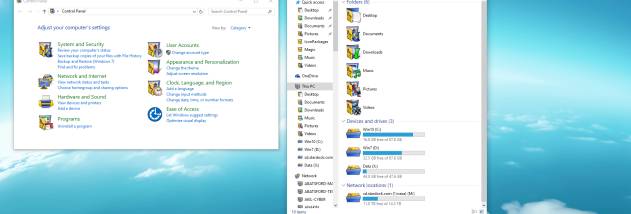



IconPackager is a Windows customization utility for changing the appearance of system and file icons. It is suited to people who want to apply a coordinated icon style across a desktop without replacing icons one by one. The program uses icon packages to group visual changes, so a complete set can be applied together rather than assembled manually for every item.
Packages can replace default Windows icons across the system, giving folders, drives, and other interface elements a consistent look. IconPackager also supports changing icons for individual file types. This is useful when a particular format should be easier to recognize, or when only selected parts of the desktop need a different appearance. Users can choose a package for broad changes and make more targeted adjustments where needed.
The application includes built-in icon packages and supports downloading additional packages from the Internet. It can also recolor icon packages, providing a way to adjust their appearance without switching to a different set. These options support both quick theme changes and more selective customization. Applying a package offers a practical alternative to editing each icon separately, while individual file-type controls help keep changes limited to the items that matter.
IconPackager is intended for personalizing the Windows desktop, creating a unified visual theme, or distinguishing commonly used file types at a glance. It is a focused icon customization tool rather than a general-purpose desktop theme editor. The software is trialware and is developed by Stardock Systems. Supported Windows releases include Windows 7, Windows 8, and Windows 10, including their listed 64-bit editions. The interface is available in Danish, English, French, Italian, Japanese, Korean, and Spanish.