qfx2qif Convert
... solution that simplifies the often complex process of financial data conversion. It is a testament to MoneyThumb's commitment to providing high-quality, user-friendly software solutions that ...

iCreateOFX converts CSV transaction files from checking accounts, savings accounts and credit cards into OFX for import into personal finance manager software. It includes pre-configured bank scripts and generic scripts for compatible file layouts. If a bank format is not supported, users can submit the file header to request support. The trialware utility runs on Windows, including Windows 10 and 11.
| Author: | Phillip Katete |
| License: | Trialware |
| Price: | $15.00 |
| Released: | Jun 29, 2023 |
| File size: | 840 kB |
| Downloads: | 434 |
| Keywords: | x64 software, OFX Converter, convert bank transactions, CSV2OFX, CSV to OFX, financial data conversion, ofx file converter, bank csv converter, csv2ofx, CSV Converter, csv to ofx, Windows 10 compatible, iCreateOFX, Phillip Katete, Converter, csv to ofx converter, user-friendly interface, CSV |
| Author URL: | https://icreateofx.co.uk/ |
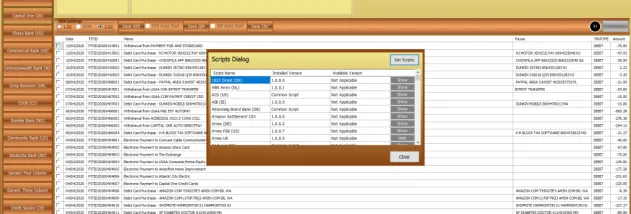

iCreateOFX is a Windows utility for converting bank account CSV files into OFX files for use with personal finance manager software. It is intended for people whose bank provides transaction downloads in CSV format while their finance application accepts or works better with OFX. The converter supports files for checking accounts, savings accounts and credit cards, giving users a way to move downloaded transactions into their existing financial records without re-entering them manually.
The conversion process uses bank scripts to interpret the structure of a CSV file and produce an OFX file. iCreateOFX includes pre-configured scripts for a selection of banks, as well as generic scripts for CSV files that follow compatible layouts. Users choose a suitable script for the source file, then convert the transactions for import into their finance manager. Script support matters because banks can arrange transaction data differently, even when they provide the same general CSV format.
When a bank is not covered by an existing script, or its CSV layout does not fit the generic options, the program provides a route to request support by submitting the bank file header. This makes the converter useful for people working with less common bank formats, although compatibility depends on a script that can correctly interpret the source data. The output is designed for transfer to personal finance software rather than for general-purpose spreadsheet conversion.
Typical uses include importing downloaded checking or savings activity into a household budget, adding card transactions to a personal ledger, and bringing bank records into finance software that accepts OFX. Converting the file can help preserve a digital transaction workflow when the bank and the finance application do not offer a directly compatible download format.
iCreateOFX is trialware from Phillip Katete and is available for Windows, including Windows 10 and Windows 11. The supported account types are checking, savings and credit card accounts. Users should select a script appropriate to their bank's CSV structure and verify the resulting transactions after importing them into their finance application.