JPEG Resampler Portable
JPEG Resampler Portable is a batch image resizing and editing ... and grayscale, and convert among formats such as JPEG, PNG, BMP, GIF, TIFF and PSD. The integrated image ...

JPEG Resampler is a batch photo tool for resizing digital camera images for websites, email and other uses. It can resize by dimensions, percentage, megapixels or target file size, and convert among formats such as JPG, PNG, BMP, GIF and TIF. Filters, EXIF handling, presets, watermarks and an image browser provide additional control over photo preparation.
| Author: | David Macek |
| License: | Freeware |
| Price: | FREE |
| Released: | Oct 3, 2012 |
| File size: | 3.90 MB |
| Downloads: | 314 |
| Keywords: | Windows 10 software, jpeg editor, resize, editor, x64 application, resampler, batch photo resizing, jpeg image converter, jpeg resizer, resize images by file size, exif photo editor, image resizing tool, David Macek, photo quality enhancement, jpeg resize, photo watermark tool, JPEG Resampler |
| Author URL: | http://software.macek.cc |
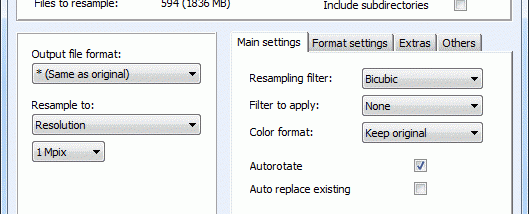

JPEG Resampler is a batch photo-resizing and image-processing utility for people who need to prepare digital camera photos for sharing, storage or other uses. It can reduce images for websites and email, while also handling format conversion, adjustments and file organization. A compact mode keeps the main controls accessible for straightforward jobs; an advanced mode exposes additional settings for more detailed processing.
Resizing can be based on megapixels, a percentage of the original dimensions, exact dimensions, maximum dimensions or a target file size, among other methods. This gives users a way to balance image dimensions and file weight for a particular destination. Eleven filters provide options such as sharpening, blurring, softening and averaging. The integrated image browser lets users select a crop area, adjust colors, choose a filter for an individual photo, rotate or flip an image, and inspect its metadata before processing.
The program converts among formats including JPG, PNG, BMP, GIF, TIF, PSD and several others, and supports multiple color formats such as RGB, indexed color and grayscale. EXIF tools can rotate photos according to orientation metadata, copy EXIF data to output files or extract it to a text file. Presets save processing settings for reuse, while filename conversion shortcuts and five sorting methods help manage batches, including images that have been renamed. Processing can use up to four threads, depending on the task and system.
Additional options include placing text or a logo as a watermark, applying special effects and adding GPS coordinates from a GPX file. JPEG Resampler can also create an HTML page containing processed images and, optionally, thumbnails. Its Windows Explorer context-menu integration provides a direct way to launch the utility for an image or directory, and its image browser supports removing selected files from a batch without leaving the workflow.
JPEG Resampler is freeware. The published operating-system list includes Windows XP, Vista, 7 and 8, including certain 64-bit editions; Windows 10 and 11 compatibility is not established by that list. The download is approximately 4 MB. Its range of batch controls suits users preparing collections of photos, while the compact interface offers a simpler route for occasional resizing and conversion.