Judy's TenKey for Windows 10 - Full description
Judy's TenKey is a desktop calculator for people who need to check, reuse and document calculations rather than treat each result as disposable. It combines familiar calculator entry with adding-machine and reverse Polish notation (RPN) modes, making it useful for office work, bookkeeping, financial calculations and other tasks where a visible record can help prevent mistakes.
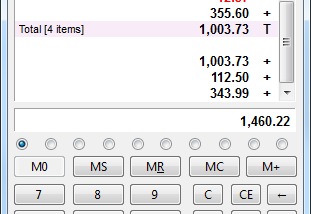
Its scrolling tape records each calculation as it is entered. Users can annotate the tape, then save or print it as a working record. Earlier entries remain available for reuse in later calculations, reducing repeated typing. If a value on the tape needs correction, the entry can be edited and the calculation is updated, so the displayed result reflects the revised figures. The tape can also be resized to suit the available workspace.
The calculator supports three approaches to entering numbers: standard calculator operations, adding-machine style entry and RPN. Its configurable display can show tools for tape, memory, statistics, functions, trigonometry, finance or a number pad. Practical options include automatic decimal insertion, international number formatting, red text for negative values and an item counter. The window can stay on top for quick access and remembers its preferred screen position between sessions; automatic Num Lock and support for a dedicated keyboard calculator key can also fit it into a regular desktop workflow.
For recurring calculations, the tape provides a way to revisit the steps behind a total instead of relying only on the final answer. It can help with checking figures, preparing printable calculation records, reusing values across related tasks and switching between calculator methods without changing applications. The statistics and finance tools extend its role beyond basic arithmetic, while the configurable display lets users keep relevant controls close at hand.
Judy's TenKey is English-language shareware for Windows desktop computers. The supplied platform information covers Windows Vista, Windows 7, Windows 8 and Windows Server, including some 32-bit and 64-bit editions; it does not establish compatibility with Windows 10 or Windows 11. The program is intended for keyboard and mouse use, with optional support for a calculator key on compatible keyboards. Its shareware license may require payment to continue using it under the applicable terms.