Acronyms Master
... a groundbreaking software developed by SBS Labs. This Windows 10 compatible software is a must-have tool for professionals who regularly work with documents filled with ...

Just Translate is a desktop editor for translating and working with text in more than 40 languages. It can recognize the source language, import text from existing files, and use an online translation service to produce a translated version. Built-in word-processing tools let users review and prepare text, then save or print translations. It is suited to emails, web content, manuals and documents.
| Author: | Jalada GmbH |
| License: | Trialware |
| Price: | $29.99 |
| Released: | Jan 1, 2019 |
| File size: | 110.00 MB |
| Downloads: | 358 |
| Keywords: | language translation app, Windows 10, multilingual communication tool, x64 software, Text Translator, translate emails, Translator, Text Translation, Just Translate, Translation, Jalada GmbH, online text translator, text translation software, translate documents, Translate, multilingual text editor, automatic language detection, Translate Text |
| Author URL: | http://www.jalada.eu/ |
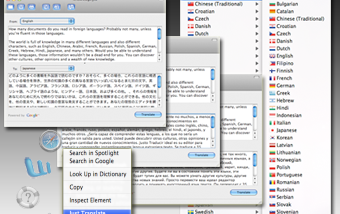

Just Translate is a desktop translation editor for people who need to read or work with text in other languages. It combines a text-editing workspace with online machine translation, helping users translate material such as emails, web content, manuals and documents without treating each task as a separate lookup. Its language coverage includes more than 40 languages, with automatic recognition available when the source language is not known.
The main workflow starts with entering or importing source text. Just Translate can open text from existing files, allowing material already saved on a computer to be brought into the editor. Users can then choose a translation direction or rely on language recognition to identify the input. The application sends the text to an online translation service and displays the translated result for review. This makes it useful for short passages as well as longer text that benefits from being handled in one editing workspace.
Built-in word-processing features support working with the source and translated text before it is saved or printed. Rather than simply displaying a translation, the editor provides a place to refine, organize or prepare text for later use. Translations can be saved for reference, shared through other applications or printed, making the program suitable for keeping a copy of translated correspondence, instructions or research material. The online service connection is central to translation, while file import and output options support a basic document workflow around it.
Typical uses include understanding foreign-language web pages and emails, reviewing manuals, and getting a first translation of written material for personal or general reference. Automatic language detection can reduce setup when the source language is unfamiliar, while the range of supported languages is useful for switching among different language pairs. As with other automated translation tools, the result may need human review when accuracy, tone or specialized terminology matters; machine translation should not be treated as a substitute for professional translation in high-stakes contexts.
Just Translate is trialware from Jalada GmbH. Its translation feature relies on a web-based service, so an internet connection is needed to request translations. The software is available for Windows, including Windows 10, and is intended for desktop use. The supplied platform information does not establish support for Windows 11, so compatibility should be checked before installation on that system.