Klakk
... to typing on a regular laptop or desktop keyboard. It is intended for people who enjoy the ... but want to keep using a thin, quiet keyboard. The keyboard itself remains unchanged; Klakk supplies audio ...

Keyboard Sounds plays an audio cue for each keystroke, giving typing a more audible feel. It offers profiles ranging from vintage typewriter clicks to science-fiction-style tones, with controls for volume, pitch and duration. Users can also add their own audio files to build a custom sound setup. The application runs in the background and is intended for writers, programmers and other frequent typists who want adjustable sound feedback while working.
| Author: | Nathan Fiscaletti |
| License: | Open Source |
| Price: | FREE |
| Released: | Mar 2, 2026 |
| File size: | 117.00 MB |
| Downloads: | 1845 |
| Keywords: | typing sounds, keyboard sounds, profile, Keyboard Sounds, GitHub, keyboard sound effects, mechanical, keyboard profile, custom keyboard sounds, keyboard sound, Keyboard Sounds free download, typing experience, keyboard, open source, typewriter sound app, Nathan Fiscaletti, sounds, audio feedback, Windows 10, download Keyboard Sounds, mechanical keyboard, keystroke audio, mechanical keyboard sounds |
| Author URL: | https://github.com/nathan-fiscaletti/keyboardsounds |


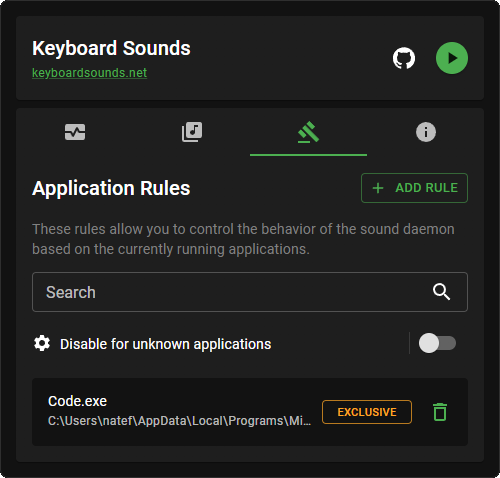

Keyboard Sounds adds audio feedback to typing by playing a sound for each keystroke. It is intended for people who spend time writing, coding, chatting or entering data and want a more audible keyboard experience, whether for personal enjoyment or to make typing feel closer to using a mechanical keyboard. Instead of relying on the physical sound of the keyboard, the application provides configurable sounds through the computer.
The program includes sound profiles with different styles, including vintage typewriter clicks and science-fiction-inspired electronic tones. Users can choose a profile to change the character of the feedback, then adjust settings such as volume, pitch and sound duration. These controls help make the effect quieter for a shared workspace or more noticeable when a stronger typing sound is preferred. The range of profiles also lets users switch between styles to suit different tasks or moods.
Keyboard Sounds also supports custom audio files, so users can bring their own sounds into the typing experience rather than relying only on the included profiles. This makes it possible to create a more personal sound setup, or to choose tones that are less distracting in a particular environment. Its settings are presented through a straightforward interface, with tooltips and documentation to help users understand the available options and configure the application.
The sound response can provide an audible cue as text is entered, which some users may find useful for maintaining a steady typing rhythm. Writers can use it to add texture to long writing sessions, while programmers and other frequent typists may prefer a chosen sound profile for everyday work. It is also suited to anyone who enjoys the audible feedback of older typewriters or mechanical keyboards but wants to add that quality through software.
Keyboard Sounds runs in the background while the user types and is designed to keep its resource use low. It is open-source software and is available at no cost. Supported systems include 64-bit Windows 10 and Windows 11, as well as Windows Server 2016, 2019, 2022 and 2025. Its focus is sound playback and customization rather than changing the keyboard's physical behavior.