Qupil
... to the download page for Qupil, an exceptional Windows 10 software developed by the talented Felix Hammer. Qupil is ... of your game. With Qupil, you can easily create, organize, and categorize your notes, making information retrieval ...

LaTeXDraw is a graphical PSTricks editor for creating diagrams to use in LaTeX documents. It provides standard shapes such as lines, circles, polygons and Bézier curves, along with PSTricks elements for grids, axes and plots. Drawings can be imported or exported as PSTricks code, and the program also supports LaTeX text, SVG, PDF and PostScript export.
| Author: | Arnaud Blouin |
| License: | Open Source |
| Price: | FREE |
| Released: | May 9, 2019 |
| File size: | 10.20 MB |
| Downloads: | 519 |
| Keywords: | LaTeXDraw, pstricks code generator, PSTricks code generation, create, pstricks editor, latex drawing editor, PSTricks code generator, latex drawing tool, PSTricks editor, generate PSTricks code, edit, latex diagram software, Arnaud Blouin, Windows 10 software, pstricks diagram maker, vector graphics editor, x64 compatible, editor |
| Author URL: | http://latexdraw.sourceforge.net/ |


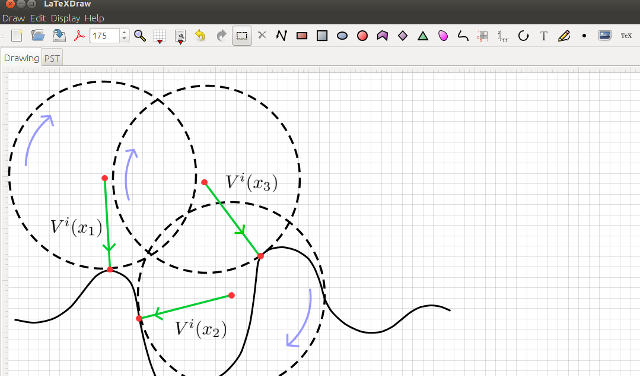



LaTeXDraw is a graphical editor for creating diagrams and generating PSTricks code for LaTeX documents. It is intended for users who want to build mathematical, scientific or technical illustrations visually, then include them in a document that uses PSTricks. Rather than writing every drawing command by hand, users can work with shapes and drawing tools and export the result as code. The application is open source and written in Java, which makes it usable across operating systems with a suitable Java runtime.
The editor supports common geometric objects, including lines, frames, circles, ellipses, arcs, polygons, triangles, diamonds and Bézier curves. These objects can be arranged and edited as parts of a diagram, making it practical to construct figures from individual elements. LaTeXDraw also supports PSTricks-specific elements such as grids, axes, plotted functions and dots. This helps when a figure needs coordinate references, graph features or symbols in addition to basic shapes.
PSTricks import and export support connects visual editing with an existing LaTeX workflow. Existing PSTricks content can be brought into the editor for further work, while completed drawings can be exported as PSTricks code for inclusion in a document. Native LaTeX text support allows labels and other text within a drawing to use LaTeX formatting, which is useful for keeping mathematical notation consistent with the surrounding document. SVG import and export provide another route for exchanging vector graphics, while PDF and PostScript export produce finished document or print formats.
LaTeXDraw is suited to preparing diagrams for coursework, research papers, lecture materials and technical documentation, especially when the final illustration needs to remain editable as PSTricks source. Its combination of graphical shape editing, LaTeX text and code export can reduce the need to construct an entire figure through manually written commands. It is also useful for revising imported drawings or moving vector artwork between SVG and LaTeX-oriented workflows.
The program is distributed under the GNU General Public License at no cost. It is written in Java and requires a Java runtime to launch. The interface is available in English, Spanish, French and German. Windows compatibility is stated for Windows XP through Windows 10; Windows 11 support is not established by that information.