LopeEdit Pro
Welcome to the download page for LopeEdit Pro, an advanced and versatile text editor developed ... need a reliable and powerful text editing solution. LopeEdit Pro is packed with features that make it ...

LopeEdit Lite is a freeware text and code editor for Windows, with tabbed documents and configurable syntax highlighting for languages such as C++, Java, JavaScript, HTML, SQL, C# and PHP. It supports Unicode, UTF-8 and Windows, Unix/Linux and Mac line endings. Search and replace tools can work across open documents or files in a folder, with regular expressions and a results window for jumping to matches.
| Author: | LopeSoft |
| License: | Freeware |
| Price: | FREE |
| Released: | Apr 9, 2020 |
| File size: | 5.20 MB |
| Downloads: | 517 |
| Keywords: | free programmer editor, Lope Edit Lite, text editor, replace, replace notepad, advanced features, text editing software, editor, find and replace files, notepad replacement, code editor, program editor, customizable interface, edit program, LopeSoft, Windows 10 compatible, edit, LopeEdit Lite, syntax highlighting editor |
| Author URL: | https://www.lopesoft.com/ |
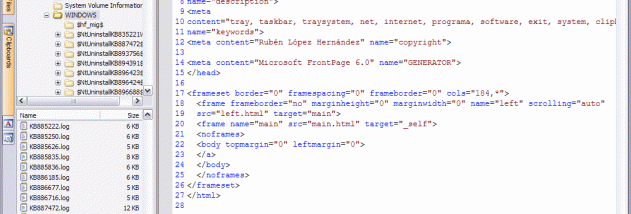

LopeEdit Lite is a freeware text and code editor for Windows, intended for programmers who want more language-aware editing tools than a basic text editor provides. It also serves as a Notepad replacement for general text work. Open documents appear in tabs, so users can switch between files without managing a separate window for each one.
The editor provides configurable syntax highlighting for languages including C and C++, Java, JavaScript, Visual Basic, XML, HTML, SQL, C#, CSS, Pascal, Perl and PHP. Highlighting makes code structures easier to scan while editing, and bracket and brace highlighting helps locate matching pairs. LopeEdit Lite supports Unicode and UTF-8, as well as Windows, Unix/Linux and Mac line endings, which is useful when working with text files created on different systems.
For navigating and arranging work, documents can be grouped in horizontal or vertical tab areas, and tabs can be moved by dragging. A toolbar field offers a quick way to find text in a document. Search and replace tools can work across the current document or open documents, while a separate option searches through files in a folder. Regular expressions and tagged expressions are supported for more specific searches, and a results window lets users open a matching file at the relevant position. Bookmarks and a recent-files window help return to useful locations and documents.
A built-in file browser can open files and handle common file and folder operations, including copying, moving and deleting. Quick view previews selected files without requiring each one to be opened in the editor. Additional workflow features include favorites, printing preview, visual themes and dockable utility windows. The editor can open files from websites and FTP locations; files opened from FTP can also be saved back to those locations. These tools suit code editing, text searches across project folders and routine changes to configuration or web files.
LopeEdit Lite is the freeware edition of LopeEdit and is available in English and Spanish. It runs on Windows, including Windows 10 and Windows 11, as well as several older Windows releases. The Lite edition is functional but does not include every feature available in the separate Pro edition. Its language highlighting and file-handling tools make it suitable for everyday programming and text editing, while the tabbed interface keeps related documents together.