GE-Graph
... destination for downloading the innovative GE-Graph software for Windows 10, developed by the renowned Sgrillo. GE-Graph is a ... your data. GE-Graph supports a variety of graph types, including bar, pie, and line graphs. It also ...

Master Key is a typing tutor for learners who want to improve speed and accuracy or practice a different keyboard layout. It offers timed and text-length drills, custom exercises, progress statistics, mastery goals and the ParaTyper game. Teachers can manage classes, set restrictions and export reports, with network data sharing between Mac and Windows.
| Author: | MacinMind Software, Inc. |
| License: | Shareware |
| Price: | $15.00 |
| Released: | Sep 30, 2012 |
| File size: | 5.00 MB |
| Downloads: | 331 |
| Keywords: | x64 application, typing practice software, typing games, typing game, Master Key, keyboard layout trainer, typing skill, typing speed test, game, typing lessons, software review, improve typing, typing tutor, improve, type, MacinMind Software, Windows 10 |
| Author URL: | https://macinmind.com/ |
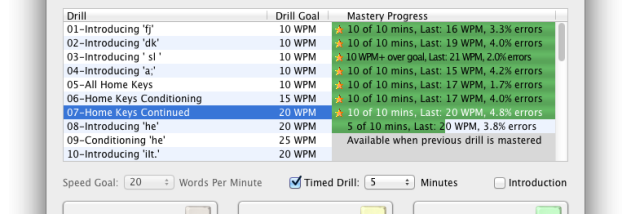

Master Key is a typing tutor for people learning touch typing or building speed and accuracy on a familiar keyboard. It supports keyboard layouts including QWERTY, Dvorak, Colemak, AZERTY and QWERTZ, making it useful for learners switching layouts as well as those practicing standard keyboard skills. Individual learners can work through prepared exercises, while teachers can use its classroom and network tools to manage practice across groups.
Drills can be timed or set by text length, with progress tracked through individual statistics and practice history. A mastery goal combines speed and accuracy, and learners can print a certificate when they meet it. The Drill Editor lets users create exercises around specific keys or vocabulary. For practice with varied material, the program can use plain text files, including lengthy texts that are divided into pages. It also allows corrections to the previous line and can pause a drill, so practice can be resumed after an interruption.
ParaTyper adds a game-based way to practice, while optional typewriter sounds provide audio feedback. Text can be displayed in 12- or 24-point type. Support for Roman-based languages lets learners build exercises from their own text, which can help adapt practice to different vocabulary or language needs. The program can also be used anonymously, without requiring a learner to create a named profile.
For schools, Master Key includes network and classroom administration features. Teachers can set preferences centrally or allow user control, configure groups with the Class Editor, and export or print class reports. Optional passwords and activity restrictions support classroom oversight. Network data can be shared between Mac and Windows installations, with only changing information stored on the network; Passenger helps create groups and users. These tools make the program suitable for organized classroom practice as well as individual use.
Master Key is shareware and is intended for Windows computers. Its features cover both guided typing lessons and flexible practice using custom text, while its reporting and controls address school deployments. The software also has a Mac counterpart, allowing network data to be shared across the two platforms. Availability and compatibility depend on the Windows system in use.