Typing Exam Software
Welcome to the home of Smart Typing Solution's "Typing Exam Software", an innovative tool designed to enhance your typing skills on Windows 10. This software is a ...

MecaNet is a typing tutor that develops keyboard skills through twenty lessons of increasing difficulty. Exercises begin with repeated key combinations, then move on to words and texts for copying. A color-coded on-screen keyboard shows which finger to use for each key, helping beginners practise hand positions. User profiles let learners follow their progress across sessions. MecaNet is freeware for Windows.
| Author: | MecaNet |
| License: | Freeware |
| Price: | FREE |
| Released: | Dec 29, 2022 |
| File size: | 5.70 MB |
| Downloads: | 310 |
| Keywords: | typing tutor, touch typing, MecaNet, user-friendly interface, skill development, keyboard learning, typing course, touch typing practice, type, write, learn to type, keyboard lessons, educational software, typing exercises, typing, keyboard, learn |
| Author URL: | http://personales.ya.com |
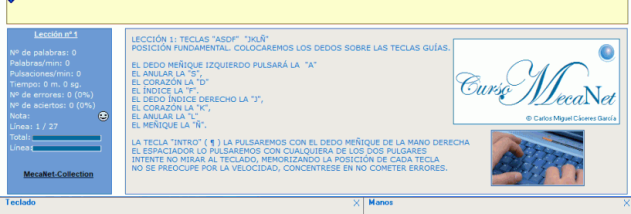

MecaNet is a typing tutor for people learning to use a keyboard or looking to build more consistent touch-typing skills. It uses a progressive lesson structure, beginning with repeated key combinations and moving on to words and longer texts. This gives beginners a clear sequence for practising finger movements before tackling more complex material, while learners with some experience can work through the lessons at a pace suited to their current ability.
The course is organized into twenty lessons that increase in difficulty. Early exercises focus on repeating combinations of keystrokes so that common movements become familiar. Later lessons apply those movements to words and passages, helping learners practise typing beyond isolated keys. The exercises appear as text and letter combinations to copy, turning each lesson into a direct practice task rather than a set of abstract instructions.
A visual keyboard helps beginners connect each key with the finger intended to press it. Keys are color-coded by finger, providing an on-screen reference while the learner copies the exercise. This can help users keep their hands in the appropriate positions and reduce reliance on looking down at the physical keyboard. Repeating the displayed drills gives learners a way to concentrate on the required movements and build familiarity gradually.
MecaNet also supports user profiles for following progress through the course. A profile is useful when practice takes place across multiple sessions, or when several people share a computer and want to keep their learning separate. The staged lessons make the program suitable for independent practice at home, introductory keyboard training, or additional exercises alongside classroom instruction. Learners can progress through the material in order and spend more time on the exercises they find challenging.
The program is freeware and is available for Windows, including Windows 10 and Windows 11. Its focus is on structured keyboard practice: it does not require learners to begin with full-length texts, since the course first develops repeated key movements and then applies them to increasingly substantial material. The color-coded keyboard and profile option support a straightforward practice routine for new typists and anyone seeking to improve their familiarity with keyboarding.