RapidTyping Portable 5.3 review by Elso (Sep 22, 2021)


I liked this little program, it was useful for me.

RapidTyping Portable is a free typing tutor for beginners and experienced typists who want to learn touch typing or improve their keyboard habits. Guided lessons provide structured practice, while custom courses let users tailor exercises to individual needs. A virtual keyboard highlights the correct finger zones and hand positions as learners type. Multiple user support suits shared computers and classroom use. The portable edition runs without installation and can be launched from removable media.
| Author: | RapidTyping Software |
| License: | Freeware |
| Price: | FREE |
| Released: | Jan 27, 2021 |
| File size: | 18.41 MB |
| Downloads: | 1060 |
| Keywords: | free typing, typing practice, progress tracking, free typing software, typing speed test, offline typing tutor, blind keyboard, wpm, net cpm, touch typing tool, typing speed, cpm, custom typing courses, net wpm, RapidTyping Portable, touch typing, keyboard emulation, portable typing software, typing test, typing tutor, touch typing lessons, customizable lessons, typing, free typing tutor, typing tutorial, user-friendly interface, typing lessons, portable, typing trainer |
| Author URL: | https://rapidtyping.com/ |
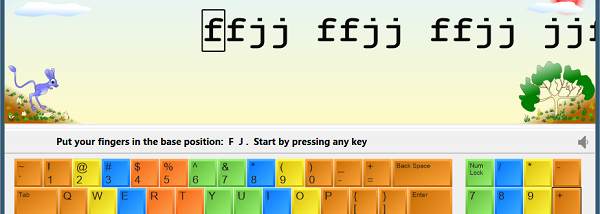

RapidTyping Portable is a free typing tutor for learners who want to build touch-typing skills or improve an existing technique. Its lessons accommodate beginners as well as people looking to correct poor keyboard habits. The portable edition runs without installation and can be launched from removable media, making it suitable for shared computers and for keeping a practice tool available across different PCs.
Lessons provide structured typing practice, while custom courses let teachers and other users tailor exercises to a learner's needs. This makes the program useful both for individual practice and for group instruction in settings such as schools. Multiple user support allows more than one learner to use the same setup, and course creation gives instructors a way to prepare practice material for different skill levels.
A virtual keyboard shows the proper hand and finger positions as learners type. Highlighted zones indicate which fingers should reach particular keys, helping users connect each keystroke with the correct movement instead of relying on guesswork. The on-screen guidance is especially useful when learning touch typing from the beginning, and can also help experienced typists replace inefficient habits with more consistent finger placement.
The program is intended for children and adults, including students, teachers, writers and professional typists. Learners can follow prepared lessons for regular practice, while customized exercises can focus on specific needs. Since it is portable, it can be carried on a USB flash drive or other media and used without a conventional installation process.
RapidTyping Portable is freeware for Windows PCs. It requires a display area of at least 1028 by 720 pixels and works with a physical PC keyboard or a touch-sensitive screen. Its combination of guided lessons, finger-position visuals, custom courses and multi-user support makes it suitable for both independent learning and classroom practice.
I liked this little program, it was useful for me.