ModelRight Professional for Windows 10 - Full description
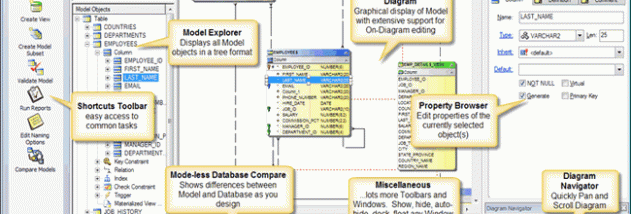
ModelRight Professional is a database modeling tool for database professionals, software developers, and data modelers. It provides a visual workspace for designing database structures, documenting existing schemas, and working with large or complex data models. Diagrams, object browsers, windows, and toolbars bring model information together, while properties can be edited directly on the diagram without opening separate dialogs.
For an existing database, reverse engineering builds a model that users can inspect and document. For a new design, ModelRight can generate the database definition language (DDL) needed to create the schema. Its comparison tools help keep a model aligned with a live database: users can review differences, apply model changes through generated ALTER statements, or import database changes back into the model. Model comparisons also help track separate designs or maintain a shared library model or data dictionary.
The workspace supports editing object properties in different orders and displaying information directly on diagrams. Hyperlinks connect related objects, making it easier to move through a large schema. Large models can be divided into subsets, which ModelRight maintains as the design changes. Notes, definitions, comments, and revision notes add context to database objects, supporting documentation for ongoing development and handoffs between teams.
Model information can be accessed through XML, ActiveX scripting, and reports. HTML reports can include model details and linked diagram images, giving teams a way to share design documentation beyond the modeling workspace. The ability to switch a schema from one database to another can also help when adapting a design for a different database environment.
ModelRight Professional is suited to database design, reverse engineering, schema comparison, and data warehousing projects, from smaller databases to large models. It is trialware and is designed for Windows; the supplied operating-system information includes Windows 10. Database professionals can use it to bring design, documentation, and database synchronization tasks into one modeling workflow.