MP3Gain (Stable)
MP3Gain is a free audio utility for listeners who ... which base adjustments on the loudest audio peaks, MP3Gain uses statistical analysis to estimate perceived loudness. The program ...

MP3Gain analyzes MP3 files and adjusts their perceived loudness without decoding and re-encoding, so the changes do not reduce audio quality. Track Gain brings unrelated songs toward a selected target level, while Album Gain adjusts a collection as a whole and preserves the volume differences between its tracks. It can also adjust files based on peak amplitude.
| Author: | Glen Sawyer |
| License: | Freeware |
| Price: | FREE |
| Released: | Sep 24, 2018 |
| File size: | 891 kB |
| Downloads: | 755 |
| Keywords: | mp3 player, mp3 volume normalizer, track gain utility, layer, Glen Sawyer, music volume, Windows 10 compatible, mp3 tracks, MP3Gain, lossless volume adjustment, mp3 audio level editor, mp3, audio volume, mp3 loudness adjustment, repair, MP3 Gain, audio normalization, lossless mp3 volume, MP3 ADJUST, MP3 repair, human ear, album gain software, open-source software |
| Author URL: | http://mp3gain.sourceforge.net/ |

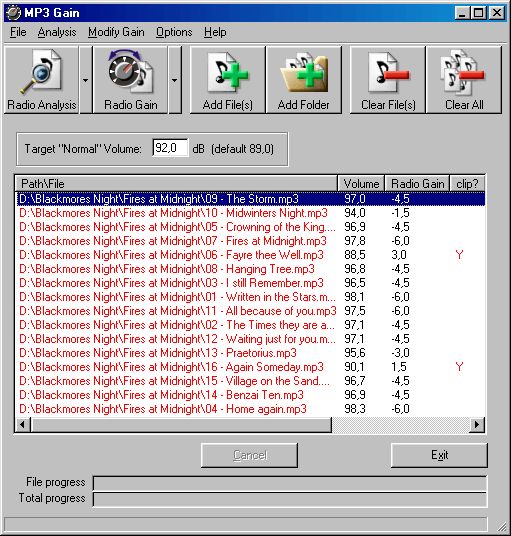


MP3Gain is a Windows utility for analyzing and adjusting the perceived loudness of MP3 files. It is useful for listeners who find that songs in a playlist or music collection play at noticeably different levels. Rather than relying only on peak normalization, it estimates how loud a track sounds to the human ear and adjusts the MP3 data directly, without decoding and re-encoding the audio. This keeps the changes lossless, avoiding the quality loss associated with re-encoding.
The program offers Track Gain for collections of unrelated songs. It analyzes each file separately, compares its loudness with a chosen target and adjusts the track toward that level. This is suited to mixed playlists, where one quiet recording followed by a much louder one can make listening inconvenient. MP3Gain can also analyze a batch of files before adjustment, helping users review the collection and select a target loudness for the set.
Album Gain is intended for related tracks that should retain their original volume differences, such as songs from the same album. Instead of bringing every track to the same loudness, it adjusts the collection as a whole toward the target while keeping the tracks' levels relative to one another. Quieter passages and louder songs therefore remain distinct, which is useful for music whose dynamics are part of the intended listening experience. The program can also make adjustments based on peak amplitude rather than its estimate of perceived loudness.
MP3Gain is focused on volume analysis and correction rather than general audio editing. Its track and album modes support different listening situations: Track Gain can help even out a shuffled mix, while Album Gain can bring recordings to a more consistent overall level without flattening their internal differences. Because it works with MP3 files directly, it is intended for users who want to adjust existing MP3 collections without creating newly encoded copies.
The program is freeware and supports MP3 files. Its stated Windows support includes Windows 10; Windows 11 support is not established here. It is a specialized utility rather than a full music player or audio production suite, so it is best suited to preparing MP3 files for playback on a computer, portable player or other device that reads the format.