WavTrim
... WavTrim, a pioneering software developed by the renowned mpTrim. This exceptional tool is designed for Windows 10 users who are passionate about audio editing and ...

mpTrim is a lightweight MP3 editor for making practical changes to existing audio files. It trims silence or unwanted sections, adjusts volume manually or through normalization, and adds fades to soften abrupt starts and endings. It also cleans up MP3 files and can recover wasted disk space. Since it works directly in MP3 format without decoding and re-encoding, processing is fast and repeated edits preserve audio quality.
| Author: | mp3 Trim |
| License: | Shareware |
| Price: | $35.95 |
| Released: | Oct 28, 2026 |
| File size: | 420 kB |
| Downloads: | 253 |
| Keywords: | mp3 editor, remove silence from mp3, WAV file processing, Windows 10 compatible, music quality, editor, edit mp3 audio, mpTrim software, add fade to mp3, audio editing, music, sound quality enhancement, trim mp3 files, mpTrim, mp3, mp3 volume normalizer, adjust volume |
| Author URL: | https://www.mptrim.com/ |

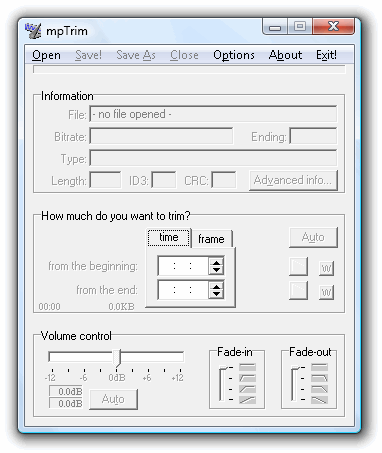



mpTrim is a lightweight MP3 editor for people who want to make straightforward changes to audio files without using a full digital audio workstation. It works directly with MP3 data rather than decoding and re-encoding the music, helping preserve audio quality through repeated edits and keeping processing fast. Its focused tools are suited to cleaning up existing tracks and preparing files for a personal music collection.
The trimming tool removes silent or unwanted material from the beginning, end, or other parts of an MP3. This is useful for cutting pauses, trimming off extra audio, or keeping only the portion of a recording that matters. Volume can be adjusted manually when a specific change is needed, or normalized automatically to bring levels into a more consistent range across tracks.
Fade-in and fade-out controls soften abrupt starts and endings, making a track feel less cut off. The program also cleans up MP3 files and can recover wasted disk space. Because edits are made in the MP3 format without a decode-and-re-encode cycle, users can make these adjustments without the repeated quality loss associated with converting audio during editing.
These tools make mpTrim useful for tidying individual tracks, balancing volume across a collection, and removing unwanted silence before playback or sharing. It is a focused editor rather than a multitrack recording or music-production environment, so its workflow centers on practical changes to existing MP3 files.
mpTrim is freeware with no evaluation period or time limit and is available in multiple languages. It supports Windows, including Windows 10 and Windows 11, as well as earlier Windows releases. The program is small, making it a compact option for users who need basic MP3 editing rather than a larger audio suite.