Edi - Text Editor
... solution developed by Polenter - Software Solutions. This Windows 10 compatible software is a game-changer for those who need a reliable and efficient text editing ...

mSecure is a password manager for storing account credentials and other sensitive information in organized records. AES-256 encryption protects the stored data, while a built-in generator creates strong passwords that can be saved with account details. More than 20 templates, search, sorting, grouping and filters help keep information easy to find. Pro adds device sync, backups, customizable templates and photo attachments.
| Author: | mSeven Software LLC |
| License: | Trialware |
| Price: | $35.00 |
| Released: | Dec 3, 2018 |
| File size: | 32.05 MB |
| Downloads: | 357 |
| Keywords: | password management, password, x64 software, secure account storage, mSeven Software LLC, password organizer, organizer, mSecure, manager, msecure password manager, password manager, encrypted records, account manager, Windows 10, password generator, data security, secure password storage |
| Author URL: | http://www.msevensoftware.com/ |
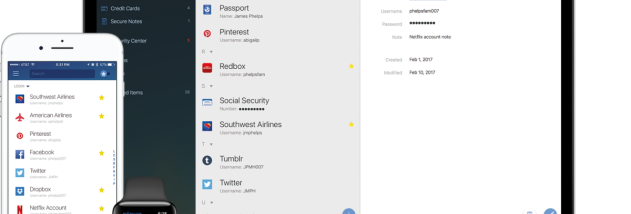

mSecure is a password manager and secure organizer for people who need to keep account credentials and other private information together. It stores details as records, using templates for common types of information so entries can be added in a consistent format. The Windows app is part of a cross-platform product that can also be used on mobile devices and Mac computers.
Records are protected with AES-256 encryption. A built-in password generator creates random, complex passwords, which can be saved alongside the accounts they belong to. Auto-lock helps protect information when the app is left unattended, while automatic backups provide another way to safeguard stored data. Deleted items can be recovered, giving users a way to restore records removed by mistake.
More than 20 built-in templates cover common record types, and Pro features allow templates to be customized. Records can also include custom fields, icons and photo attachments. Search, sorting, filters and groups help narrow a large collection, while favorites provide a shortcut to frequently used items. Together, these tools let users keep passwords, account details and other sensitive records organized without relying on a single flat list.
The Pro edition can synchronize records across devices through Dropbox, Wi-Fi or mSecure Cloud. Backup and restore tools support moving or recovering the collection, while synchronization keeps its contents available across supported platforms. Free features include unlimited records, built-in templates, organization tools and the password generator; Pro features are available for a 30-day trial and require a license afterward.
mSecure is trialware for Windows, with selected functions available without charge and Pro functions requiring purchase after the trial. The Pro license is a one-time purchase rather than a subscription and covers use across supported Windows, Mac, iOS and Android devices. Sync and cross-platform access are intended for users who manage information on more than one device; the Windows app is suited to keeping a private, searchable store of credentials and other personal records.