OpenProj for Windows 10 - Full description
OpenProj is a desktop project management application for people who need to plan schedules, organize work and monitor project costs. It provides an alternative to commercial planning tools and can open existing Microsoft Project and Primavera project files, making it useful for teams moving projects between applications as well as for new plans created from scratch.
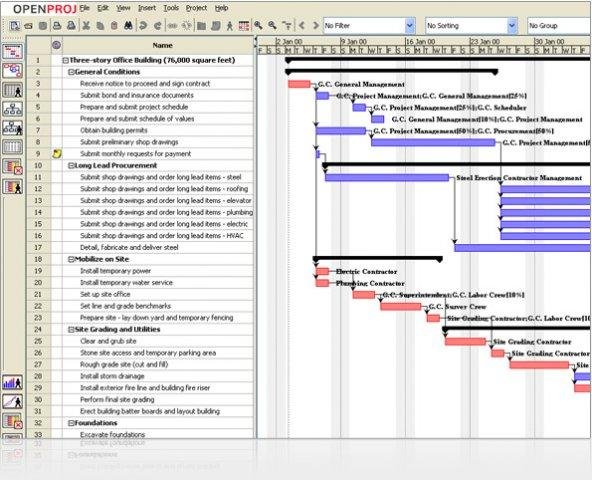
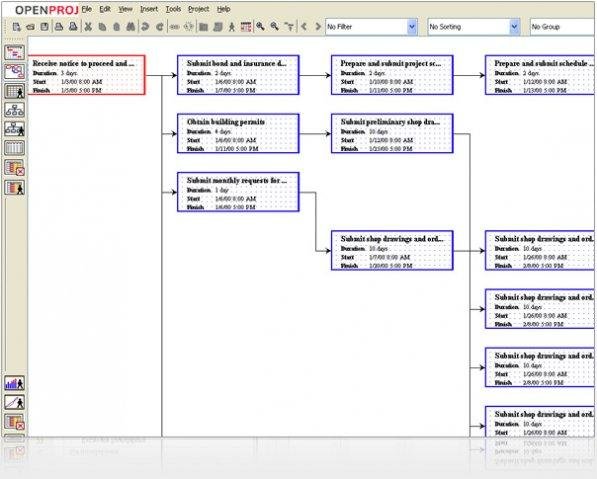
Its scheduling tools help users arrange tasks and dependencies into a project plan. Gantt charts show activities along a timeline, making it easier to review duration, sequence and progress. Network diagrams, also known as PERT charts, present task relationships as a connected flow, which can help identify how work depends on other activities. These views offer different ways to inspect the same schedule, from a calendar-like overview to a map of dependencies.
OpenProj also supports work breakdown structure (WBS) and resource breakdown structure (RBS) charts. A WBS organizes project scope into smaller components, while an RBS groups the resources involved in carrying it out. Earned value costing provides a way to compare planned work, completed work and costs, helping project managers assess performance alongside the schedule. Together, the charts and costing features support planning and review without requiring separate tools for each view.
The application is intended for desktop project management, including projects that need structured schedules, resource organization and cost tracking. Teams can use it to build plans, inspect task relationships, and exchange project files with users of Microsoft Project or Primavera. Its multiple chart types are suited to different working needs: detailed task sequencing, communicating the project structure, or reviewing resource and cost information.
OpenProj is free and distributed under the CPAL license. It is available for Windows as well as Linux, Unix and Mac, and its interface has been translated into several languages, including French, Spanish, German, Portuguese, Swedish, Finnish, Persian, Russian, Korean and Chinese. Windows compatibility is stated through Windows 10; Windows 11 support is not established here.