PDF Creator Pro
Welcome to the download page for PDF Creator Pro, a cutting-edge software developed by GIRDAC InfoTechnologies, exclusively designed for Windows 10 users. With PDF Creator Pro, you can effortlessly convert any file format ...

pdfFactory is a virtual PDF printer that creates files from documents printed in other applications. It previews output before saving, combines print jobs from multiple sources, and lets users insert or remove pages. PDF security options restrict opening, printing, copying or editing, while font embedding preserves document appearance. Finished files can be sent by email or copied to the clipboard.
| Author: | Fineprint |
| License: | Trialware |
| Price: | $49.95 |
| Released: | Mar 11, 2024 |
| File size: | 16.30 MB |
| Downloads: | 525 |
| Keywords: | combine pdf documents, printer x64, pdf Factory x64, Fineprint pdfFactory, x64 bit software, PDF creation tool, pdf creator, x64 pdf, Windows x64 bit, creator x64, convert print to pdf, x64 pdf document, password protect pdf, High-quality PDFs, Document conversion, pdf preview tool, virtual pdf printer, pdf printerx64, pdf creator x64, Windows 10 compatible |
| Author URL: | https://fineprint.com/ |
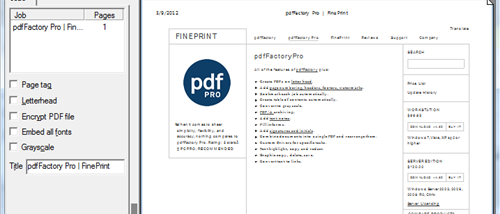

pdfFactory is a virtual PDF printer for Windows that creates PDF documents from content in other applications. It suits people who need to turn reports, emails, web pages and other printable material into shareable files, without opening a separate PDF authoring program. A document is sent to pdfFactory through the application's print command, then reviewed and assembled before the PDF is created.
The preview shows the compiled document before saving, with zoom up to 400 percent for checking layout and content. Multiple print jobs can be combined into one PDF, including material produced by different programs; continuing to print into the same session adds pages to the combined document. Pages can also be removed or inserted before output, which is useful for omitting unwanted sections from long reports, email threads or web pages. The software can send the finished PDF through the default email program or copy it to the clipboard for pasting into an existing message.
PDF security controls can require a password to open a file and restrict printing, copying text and graphics, or editing. Font embedding helps preserve the appearance of documents when recipients do not have the original fonts installed. Clickable links to web pages and email addresses can be customized by line type, thickness and color. AutoSave retains the contents of pdfFactory sessions, allowing previously compiled documents to be retrieved.
The print workflow can also send output to a physical printer, avoiding the need to print once for paper and again to create a PDF. Since pdfFactory works with printable output from other applications, it can be used to collect material from several sources, check it in one preview, remove pages and then distribute a single document. It is intended for everyday document conversion and assembly rather than editing the original files in their source applications.
pdfFactory is trialware and is offered here for 64-bit Windows. The supplied operating-system information includes Windows Vista, Windows 7, Windows 8, Windows 10 and Windows 11; support is identified as 64-bit for the earlier systems. The program does not require Acrobat to create or print PDFs. Its separate Server Edition is intended for server deployment.