Portable RightNote
... the program. Integration with Google Drive, Dropbox and Evernote supports working with notes across services. Encryption options are available for protecting sensitive information. Together, these ...

Evernote is a note-taking and organization app for collecting notes, research, web captures, images and documents in notebooks. Its editor supports formatted notes with PDFs, scans, links, tables and audio, while templates help with planning and task management. Tags aid retrieval, and cloud sync makes notes accessible through an account on supported devices and the web. Users can share notes for collaboration and connect services such as Google Calendar, Microsoft Teams and Slack.
| Author: | Evernote Corporation |
| License: | Trialware |
| Price: | FREE |
| Released: | Oct 30, 2026 |
| File size: | 386.00 MB |
| Downloads: | 663 |
| Keywords: | share notes, digital notebook, manage, cloud-based storage, EverNote user interface, cross-platform synchronization, note organizer, EverNote organization tools, digital note-taking, EverNote productivity, note, note management, note taking app, note manager, Ever Note, management, sync notes, evernote download, capture memo |
| Author URL: | https://evernote.com/ |


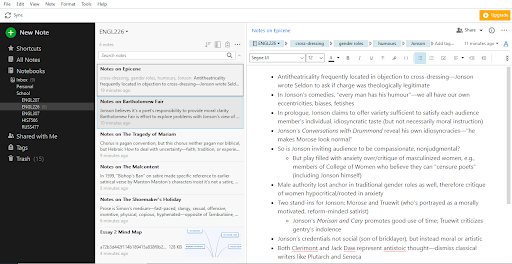

Evernote is a note-taking and organization app for people who need to keep personal, study or work information in one searchable place. It stores notes, research, web captures, images, documents and other material, then organizes them in notebooks. Cloud synchronization keeps notes available through an Evernote account on supported devices and the web, making it practical to move between a Windows computer and other places where the account is used.
The editor supports notes created from scratch or from templates for activities such as planning, task management and organizing projects. Notes can combine formatted text with images, scans, PDFs, links, tables and audio recordings, so reference material and written context can stay together rather than being scattered across separate files. The Web Clipper captures material from websites for later reference, helping users collect research without copying each page into a document manually.
Evernote also brings task lists and calendar events into the same workspace as notes and files. Notebooks provide a way to group related material, while tags help categorize items across notebooks and make them easier to find. Sharing lets collaborators work with notes and keep project information accessible to a group. Connections with services such as Google Calendar, Microsoft Teams and Slack can fit Evernote into existing planning and communication workflows.
The app can support everyday uses such as keeping meeting notes, collecting reading and research, maintaining checklists, planning events and storing documents for later retrieval. Teams can use shared notes for project planning, while individuals can keep personal reminders and reference material alongside work. Its range of content types makes it useful both for quick notes and for building a longer-term archive of information.
Evernote is trialware and is offered for 64-bit Windows 10 and Windows 11. Cloud access and synchronization require an Evernote account and an internet connection; locally using the Windows app does not make shared or synced content available to other devices without connectivity. The available tools and service limits may depend on the account plan. Users should review current plan details and system requirements before installing.