PDF-Analyzer (en-version)
Welcome to the world of seamless PDF analysis with the PDF-Analyzer (en-version) developed by Ingo Schmoekel. This Windows 10 software is a must-have tool for anyone who frequently ...

PDFTK Builder Portable is a Windows PDF utility that presents PDFtk operations through a graphical interface. It can reorder, remove, duplicate and combine pages, split a PDF into separate page files, rotate selected pages, add a PDF background or stamp, and protect output with user and owner passwords. Its portable package can run from removable storage.
| Author: | Portableapps |
| License: | Open Source |
| Price: | FREE |
| Released: | Jul 31, 2018 |
| File size: | 3.50 MB |
| Downloads: | 393 |
| Keywords: | pdf files, pdf file, Windows 10 software, adobe, x64 compatibility, PDFTK Builder Portable, password protect, split pdf pages, Portableapps, pdf page organizer, password protect pdf, password protection, add pdf watermark, PDF document, pdf, rotate pdf pages, merge pdf files, PDF manipulation, software review, adobe pdf |
| Author URL: | https://portableapps.com/ |
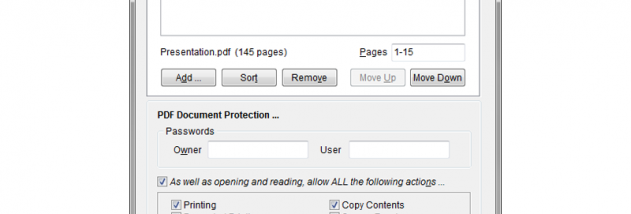

PDFTK Builder Portable is a lightweight Windows utility for changing the structure and appearance of PDF documents. It provides a graphical interface to the PDFtk command-line tool, making common PDF operations available without requiring users to work directly with command syntax. It is suited to people who need to combine, reorder, divide, rotate, watermark or protect PDF files using a straightforward desktop workflow.
The Collate function assembles pages from one or more PDFs into a new document. Within a source file, pages can be reordered, removed or duplicated; pages from separate files can also be brought together. This is useful when preparing a document from selected sections, correcting page order or joining related files. Split performs the inverse task by saving each page of a PDF as an individual file, which can help when distributing or handling pages separately.
Background and Stamp add another PDF page to the source document. A background is placed behind the original content, while a stamp sits on top; either can be applied across the document or, for a background, limited to the first page. The added page can serve as a logo or a draft watermark. Rotate changes the orientation of a selected range of pages, helping correct scans or adjust individual sections without altering the rest of the document.
The password protection option creates an encrypted output PDF with user and owner passwords. A user password is required to open and read the protected document. An owner password can restrict actions such as printing or copying, while still allowing the document to be opened. These controls make the utility useful for routine document preparation, page cleanup, combining reports and applying basic access restrictions. The resulting PDF can then be saved and shared through the usual file workflow.
The PortableApps package can be run from removable storage such as a USB drive or portable hard drive, or from a CD, so the utility can be carried between computers. Its portable design is intended to avoid leaving personal information behind on the host computer. PDFTK Builder Portable is open-source software and is designed for Windows; the provided platform information includes Windows 10. Users should keep the source PDFs and review the output after editing, particularly when applying page selection, rotation or password restrictions.