PDFtoMusic Pro
Welcome to the world of PDFtoMusic Pro, an innovative software developed by Myriad Software. ... to play a piece from a PDF file, PDFtoMusic Pro is your go-to solution. This software is equipped ...

PDFtoMusic reads sheet music in PDFs exported from notation software and turns it into a score that can be played back. It can sing lyrics, giving singers and musicians an audible reference for practice or rehearsal. Scanned sheet music is not supported. The Pro edition adds MusicXML export and controls for adjusting score recognition.
| Author: | Myriad Software |
| License: | Demo |
| Price: | $49.00 |
| Released: | May 15, 2024 |
| File size: | 30.50 MB |
| Downloads: | 330 |
| Keywords: | play sheet music pdf, musicxml score converter, sing sheet music lyrics, melody extraction, music score playback, music, sheet music software, pdf, PDFtoMusic, Myriad Software, MIDI file, music transcription, pdf convertor, pdf to midi, PDF conversion, pdf sheet music player, convert, music file |
| Author URL: | https://www.myriad-online.com/ |
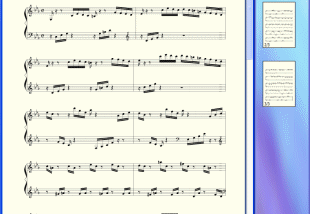

PDFtoMusic converts digital sheet-music PDFs into playable musical scores. It is intended for musicians, singers, choir members and music educators who want to listen to a score without entering the notes by hand. The program reads PDFs exported from music notation software, interprets their printed symbols and lets users start playback from the document. This makes it possible to check how a piece sounds before rehearsing or to listen to music found in a digital score collection.
After opening a supported PDF, PDFtoMusic analyzes the notation and reconstructs the score for playback. Users can hear the result through the program rather than relying on a separate notation editor to recreate the music. For vocal scores, the program can sing the lyrics, helping singers follow the text in context and hear how it aligns with the notes. Listening can also help with familiarizing a choir or ensemble with a piece, checking a musical passage, or reviewing a part away from a rehearsal.
The format of the source file is important. PDFtoMusic is designed to interpret PDFs produced by score-editing applications, where the musical symbols are represented in a form the program can analyze. It does not handle scanned sheet music, including page images saved as PDFs. A scanned page may look like a score on screen but does not provide the same structured notation information, so it cannot be processed in the same way. This distinction makes the program most useful with digitally exported scores rather than scans of printed pages.
PDFtoMusic can be used as a listening tool alongside notation applications. Users who want to make substantial changes to the reconstructed score can continue their work in Myriad's Melody Assistant or Harmony Assistant, where parts can be altered or removed, music transposed, and arrangements reworked. The Pro edition adds MusicXML export for transferring the result to many professional score editors, along with controls for adjusting calculation settings. These features are separate from the basic purpose of opening a compatible PDF and hearing the score.
PDFtoMusic is offered as demo software and is available for Windows 10 and Windows 11, as well as older Windows releases. It is a practical choice for people who already have digitally generated score PDFs and want an audible reference without first recreating the notation manually. It is not a general-purpose PDF audio converter: ordinary documents and image-only sheet music are outside its intended input. Users who need score editing or interchange with other notation software can consider the companion applications or the Pro edition's additional export options.