PeakCompressor for Windows 10 - Full description
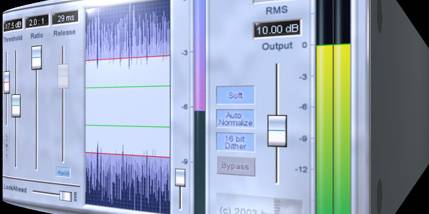
PeakCompressor is a VST audio compressor from Sinus for processing audio in music production and recording workflows. It combines soft compression with normalization, giving users tools to control signal dynamics and adjust audio levels within a compatible host application. Its controls and processing are presented through the Sinus Wave Display Interface (SWDI), which provides a waveform-oriented view of the audio.
Soft compression reduces the difference between louder and quieter passages more gently than aggressive dynamic control. Look-ahead processing lets the effect inspect incoming audio before applying gain reduction, helping it respond to peaks. Non-linear release curves shape how quickly compression eases after a signal falls, allowing the effect to recover in a less uniform way. These options are useful when managing transient peaks while aiming to preserve a natural-sounding performance.
The plugin also includes normalization, which adjusts signal level toward a consistent target, and 16-bit dithering for preparing audio at that bit depth. It processes internally at 32-bit precision and supports sample rates up to 96 kHz. The design is intended to avoid pumping and coloration, while low CPU usage can help keep processing demands modest in sessions that use multiple effects.
PeakCompressor can be used to even out levels on individual tracks, control peaks in recorded material, or apply gentle dynamic processing as part of a mixing chain. Its compression, normalization and dithering functions cover related but distinct tasks: compression shapes changes in dynamics, normalization sets signal level, and dithering is relevant when reducing bit depth for an output file.
PeakCompressor is distributed as shareware and requires a host that supports VST plugins. The supplied system compatibility information includes Windows XP, Vista, 7, 8 and 10; it does not establish compatibility with Windows 11. Its compact 256 KB download is focused on the plugin rather than a full audio workstation.