Antenna Web Design Studio
Spencer is a lightweight alternative Start menu for Windows users who prefer a classic, straightforward ... reach common system functions. It adds a compact menu to the taskbar, offering a familiar layout for ...

Portable Start Menu organizes application shortcuts in a custom launcher that can be kept on a USB stick or another portable device. Drag and drop to add, remove or rearrange entries, then group programs into folders. An auto-start manager can open selected apps when the menu starts, and password protection adds access control. It is freeware for supported Windows PCs.
| Author: | Martin Aignesberger |
| License: | Freeware |
| Price: | FREE |
| Released: | Jan 29, 2025 |
| File size: | 4.20 MB |
| Downloads: | 158 |
| Keywords: | start menu, portable, Portable Start Menu free download, software, menu, start menu organizer, customizable launcher, launcher, customization, shortcut, custom program menu, usb app launcher, efficient navigation, create start menu, portable application, Windows productivity, download Portable Start Menu, launch, Martin Aignesberger, application organizer, application shortcut manager, portable start menu, Portable Start Menu, application launcher, portable application launcher |
| Author URL: | https://www.aignes.com/lwa.htm |

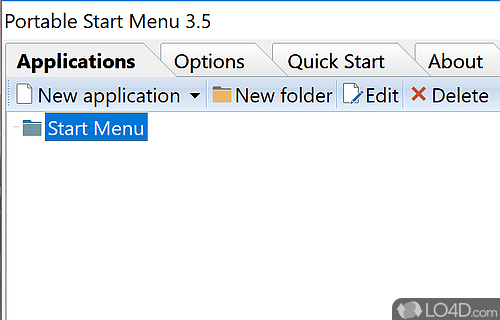
Portable Start Menu is a lightweight application launcher for organizing and opening programs from a custom menu. It is useful for people who want a compact alternative to searching through desktop icons or the Windows Start menu, and for those who carry a preferred set of shortcuts between computers. The menu can be stored on a USB stick or another portable device, keeping its application organization available wherever that device can be used.
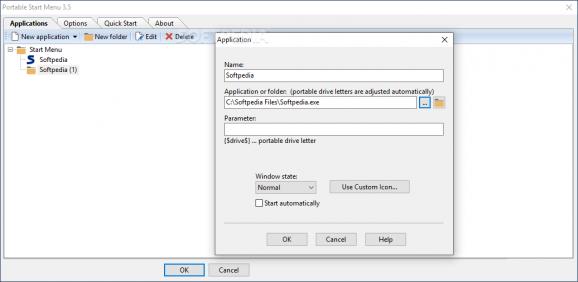
Applications can be added, removed and rearranged with drag and drop, making it straightforward to build a menu around frequently used software. Folders let users group shortcuts by purpose, such as work, utilities or media, so larger collections remain easier to scan. Rather than hunting through a long list of installed programs, users can open the menu and select the shortcut they need. Its customizable settings allow the menu layout and behavior to be adjusted to individual preferences.
An auto-start manager can launch selected programs when Portable Start Menu itself starts. This is practical for a regular work routine that begins with the same set of applications, reducing the need to open each one separately. The menu can also be password-protected, adding a layer of access control when the device is shared or used in public. These options support both a simple launcher setup and a more structured collection of shortcuts for portable work.
Typical uses include keeping commonly used tools together on a USB drive, organizing shortcuts for a busy Windows desktop, and carrying a familiar launch menu between compatible PCs. Portable Start Menu manages access to applications through shortcuts; its portable-menu function does not mean that every program added to it can run portably or without installation. Users should keep each application's own requirements in mind when moving between systems.
Portable Start Menu is freeware by Martin Aignesberger. It supports Windows 11 and 64-bit editions of Windows 10, Windows 8 and Windows 7. Its focus is on arranging and launching applications rather than replacing them, with folder organization, drag-and-drop editing, auto-start choices and password protection available in one small utility.