QuickMonth Calendar x64
QuickMonth Calendar x64 is a lightweight desktop calendar for Windows that appears when the mouse pointer ... quick view of dates without opening a separate calendar application. The calendar can also be shown or ...

QuickMonth Calendar is a small freeware utility that displays a month calendar beside the Windows system tray clock when the mouse hovers over it. Users can toggle the calendar with a keyboard shortcut, navigate between months, choose a month or year directly, and return to today. Its position follows the taskbar, and its colors match the active Windows theme.
| Author: | Chasqui |
| License: | Freeware |
| Price: | FREE |
| Released: | Apr 6, 2017 |
| File size: | 737 kB |
| Downloads: | 443 |
| Keywords: | desktop calendar, QuickMonth Calendar, display, calendar, show calendar, show, calendar popup, quick month calendar, codedawn.com, Windows 10, month view, system tray calendar, calendar window, calendar shortcut, x64 software, display calendar, Chasqui |
| Author URL: | http://www.codedawn.com/ |

QuickMonth Calendar is a lightweight desktop utility for Windows users who want a month view close at hand without opening a separate calendar application. It appears beside the system tray clock when the mouse pointer hovers over the clock, making it useful for checking dates while working in other programs.
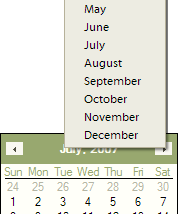
The calendar can also be shown or hidden with the Windows+Q keyboard shortcut, or with another key combination chosen in its settings. Month navigation buttons move forward and back one month at a time. For quicker changes, clicking the month name opens a menu of months, while clicking the year lets users change the displayed year. A right-click on the calendar, or a click on its Today area, returns the view to the current date.
QuickMonth Calendar positions its window according to the location of the Windows taskbar, keeping it next to the system tray clock whether the taskbar is along the bottom, top, left, or right edge of the screen. If the taskbar is moved, Windows may need to be restarted before the calendar follows its new position. The calendar's appearance follows the system colors used by the active Windows theme or visual style.
The compact calendar is suited to people who regularly check dates while reading, writing, scheduling or working in desktop applications. Its hover display and keyboard toggle provide two ways to open it, while the month and year controls make it possible to look beyond the current month without launching a larger calendar program. QuickMonth Calendar is freeware and supports Windows XP, Vista, 7, 8 and 10.