Rohos Mini Drive
Rohos Mini Drive is a freeware utility for protecting personal files stored on a USB flash drive. It creates a password-protected partition on the drive, giving users a separate place to keep documents ...

Rohos Mini Drive creates a password-protected partition on a USB flash drive for storing personal files. The setup process lets users choose a password, then provides controls to change the partition size or drive letter. Its companion Rohos Disk Browser can open, save, delete, search, and show properties for files in the protected area, including on computers that cannot access it normally.
| Author: | Tesline-Service.SRL |
| License: | Freeware |
| Price: | FREE |
| Released: | Jul 1, 2020 |
| File size: | 20.00 MB |
| Downloads: | 456 |
| Keywords: | protect, password protection, usb drive encryption, drive, rohos mini drive, secure partition, USB drive security, password, secure usb partition, password protect usb, encrypted flash drive, disk encryption, encrypt, Tesline-Service.SRL, portable file protection, security, USB, Rohos Mini Drive |
| Author URL: | https://www.rohos.com/ |
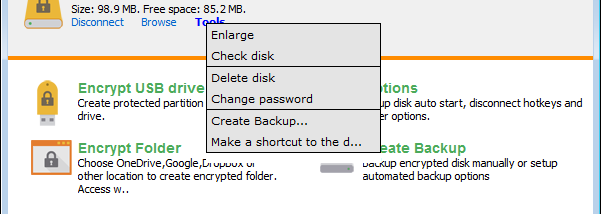

Rohos Mini Drive is a Windows utility for keeping personal files on a USB flash drive in a password-protected partition. It is intended for people who carry documents or other private files between computers and want the protected area to travel with the drive. The setup program installs Rohos Mini Drive and Rohos Disk Browser; the partition manager can also install itself as a portable app on the flash drive when creating the partition.
To set up a drive, connect it and choose the option to create a protected partition. The process requires choosing a password, then Rohos Mini Drive creates the partition on the flash drive. Its size and drive letter can be adjusted afterward. The program also provides options for changing the password and managing the drive, so routine setup and maintenance do not require navigating a large collection of controls.
Rohos Disk Browser provides access to files inside the protected partition, including on a computer that cannot read it through the usual drive interface. Its file tools can open, save, and delete items, as well as display file properties. A pull-down menu provides shortcuts for searching and opening the partition. Rohos Mini Drive also supports opening the protected drive on systems where the user lacks administrator rights, which can help when working on shared or public computers.
The software is useful for carrying personal documents on a flash drive, keeping them separate from ordinary files, and accessing them while moving between computers. The password-protected partition can reduce exposure if the drive is misplaced, while the included browser offers a way to work with its contents when the host computer does not provide direct access. Users should keep the password available, since it is needed to access the protected files.
Rohos Mini Drive is freeware for Windows. The supplied operating-system support covers Windows 7, Windows 8, and Windows 10, including their 64-bit editions. It works with a USB flash drive, and the partition size depends on the available capacity of that drive.