Sandboxie Plus
Welcome to the home of Sandboxie Plus, a masterstroke in Windows 10 software development ... browsing the web, or opening potentially harmful files, Sandboxie Plus ensures that any changes made are confined ...

Sandboxie runs selected programs in an isolated area to keep many of their changes separate from the rest of Windows. Users can launch a browser to contain browsing history, cookies, cache and downloaded files, then discard the sandbox contents after a session. It is also useful for testing software or handling email attachments in a separated environment. Sandboxie runs in the background and supports 64-bit Windows 7, 8, 10 and 11. It is trialware.
| Author: | David Xanatos |
| License: | Trialware |
| Price: | $40.00 |
| Released: | Oct 27, 2026 |
| File size: | 23.70 MB |
| Downloads: | 713 |
| Keywords: | x64 architecture, Windows 10 compatibility, application isolation software, isolated software testing, isolate, quarantine, isolation technology, secure browsing, sandbox browser, run programs in sandbox, protect, show process, discard sandbox files, isolate website, David Xanatos, Sandboxie Plus, quarantine website, sandbox email attachments |
| Author URL: | https://xanasoft.com/ |
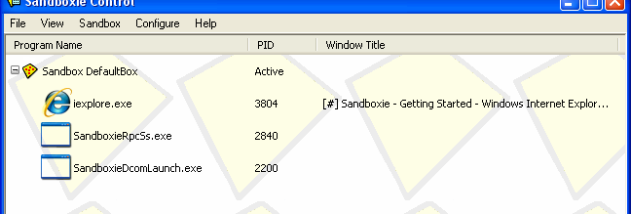


Sandboxie runs selected Windows programs inside an isolated area, called a sandbox, to keep their activity separate from the rest of the system. It is intended for people who want to test unfamiliar software, browse the web with temporary files contained, or run applications without allowing their changes to persist in the usual Windows environment. Rather than replacing antivirus software, it provides an additional layer of separation for supported programs.
When an application runs in a sandbox, Sandboxie redirects many of its file and system changes into the isolated area. This lets the program operate while limiting its access to permanent data outside that space. A browser can be launched this way, keeping browsing history, cookies, cached files and downloaded content within the sandbox. When the session is finished, the contained data can be discarded instead of remaining among the user's normal files. This is useful for short-lived browsing sessions or examining downloads, though isolation should not be treated as a guarantee against every security threat.
The same approach can be used with email programs and other applications that handle potentially risky content. Running an application in isolation can help prevent its activity from changing unrelated programs or data, and installing or testing software inside a sandbox can keep trial changes apart from the regular Windows setup. Sandboxie works in the background, so applications can be started and used in their contained environment without requiring a separate virtual machine for each task.
Typical uses include trying software before deciding whether to keep it, opening web content in a temporary environment, and keeping browsing traces separate from everyday Windows data. It can also help users who need to compare how an application behaves in a clean space or want an easy way to remove the files created during a particular session. The sandbox's contents are separate from the system, but users should still exercise normal caution with suspicious files and websites.
Sandboxie is trialware. It supports 64-bit editions of Windows 7, Windows 8, Windows 10 and Windows 11. Its isolation model is designed for running selected applications within Windows rather than creating a full virtual computer, making it suited to focused testing and containment tasks. The program is useful when users understand which applications they are launching in a sandbox and manage the sandbox's contents according to whether they want to retain or discard them.