MediaInfo Lite
Discover the power of MediaInfo Lite, a versatile tool developed by Codec Guide ... companion for media enthusiasts and professionals alike. With MediaInfo Lite, you can effortlessly access vital data such ...

Shark's MediaInfo Tool reads technical details and tags from audio and video files, then opens a plain-text report in Notepad. It shows properties such as format, size, duration, bit rate, codec, aspect ratio, frame rate, and audio details. Files can be opened through a dialog, sent from File Explorer, or dropped onto the desktop shortcut. It views metadata but does not edit it.
| Author: | Shark007 |
| License: | Freeware |
| Price: | FREE |
| Released: | Oct 6, 2026 |
| File size: | 4.50 MB |
| Downloads: | 26 |
| Keywords: | IDv3, Shark's MediaInfo Tool, Shark's MediaInfo Tool free download, video information, MediaInfo, Windows 11, media file report, Windows 10 64-bit, metadata, audio video information, media metadata viewer, audio video metadata, media fil, audio file metadata, tagger, metadata reader, download Shark's MediaInfo Tool, freeware, video codec checker, metadata viewer |
| Author URL: | https://shark007.net/ |


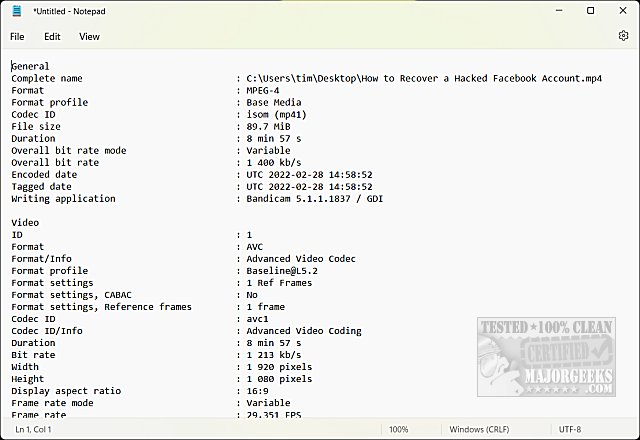

Shark's MediaInfo Tool is a lightweight metadata viewer for people who want to inspect the technical details and tags of audio and video files. Rather than editing media tags, it reads information embedded in a selected file and produces a plain-text report. The report opens in Notepad, making the results easy to read, copy, or save for later reference without learning a specialized interface.
Files can be analyzed in several ways. Opening the tool launches a standard file-selection dialog, where a media file can be chosen for inspection. Alternatively, a file can be sent to the tool through Windows File Explorer's Send to menu, or dragged onto its desktop shortcut. Each method leads to the same report, so users can choose whichever fits their usual file-management workflow.
The report combines general file details with audio and video properties. It can show the file path, format, profile, size, duration, and bit rate, along with information such as the codec, aspect ratio, and frame rate. Audio-specific properties and available tag information are also included. This makes the tool useful for checking how a file is encoded, comparing media before playback or conversion, and identifying technical details that are not obvious from the filename alone.
Because the output is plain text, it can be kept as a local record or shared with someone troubleshooting a playback or compatibility issue. It can also help users catalog a media collection, verify file properties, or gather information before choosing a conversion or editing workflow. The tool is a reader, not a tag editor: it does not change metadata or alter the media file.
Shark's MediaInfo Tool is freeware and does not require installation. It is intended for 64-bit editions of Windows 10 and Windows 11. Its straightforward file-opening options and Notepad-based reports suit users who need a quick technical overview without a full media-management application.