SIPp for Windows 10 - Full description
SIPp is an open-source command-line tool for testing systems that use the Session Initiation Protocol (SIP). It generates call traffic and can act as either a user agent client (UAC) or user agent server (UAS), making it useful to administrators, developers and telecom engineers evaluating SIP proxies, PBXs, media servers, gateways and related equipment. Tests can model a single call or simulate many user agents placing calls to a service.
The included SipStone scenarios provide basic call flows using SIP INVITE and BYE messages. For more specific tests, SIPp reads custom XML scenario files that define call sequences, from straightforward exchanges to conditional and more complex interactions. The scenarios let testers control how a call is set up and released, then check how a system handles the resulting signaling traffic. SIPp can also run one call and exit with a pass-or-fail result, which suits automated checks as well as larger load tests.
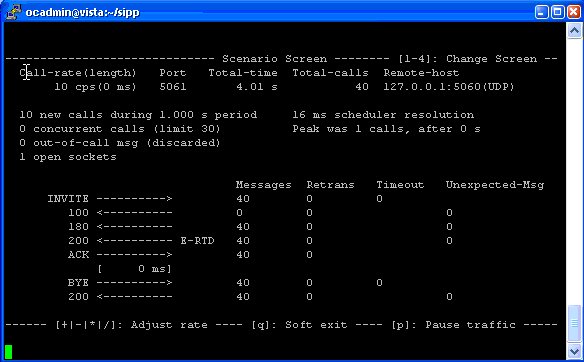
During a test, the program displays statistics such as call rate, round-trip delay and message counts. It can periodically write statistics to CSV files for later review or comparison. Call rates can be adjusted dynamically, while UDP and TCP transport options support multiple sockets or multiplexed connections; retransmission management helps test behavior when messages need to be resent. Further protocol and scenario options include IPv6, TLS, SIP authentication, call-specific variables, timeout handling and regular-expression extraction and reinjection of protocol fields. Scenario actions can log events, execute system commands or stop a call when a message is received, and external CSV data can supply fields for simulated users.
SIPp can generate media traffic as well as SIP signaling. RTP echo and RTP or packet-capture replay can be used to exercise media paths, with audio and audio-plus-video options. These features help distinguish signaling performance from media handling when testing a SIP service. Together with call and message statistics, they support controlled checks of system capacity, response behavior and robustness under traffic or stress.
The program is open source and is available for Windows systems, including Windows 10. It is intended for technical testing rather than everyday calling, and its command-line workflow and XML scenarios are best suited to users comfortable configuring test cases and interpreting SIP traffic. SIPp includes HTML and PDF documentation covering its scenarios and test options. The supplied system information does not establish Windows 11 compatibility, so compatibility should be checked for the specific build in use.