Spamihilator Portable (x32 bit)
Spamihilator Portable is an email spam filter for Windows ... or functions. Messages classified as spam are held in Spamihilator's Recycle Bin rather than passed to the mail ...

Spamihilator filters incoming email between a mail client and server, keeping suspected junk out of the inbox. It uses a trainable Bayesian filter alongside word, link, DCC and rule filters, with options for custom words and regular expressions. A Recycle Bin lets users review or restore filtered messages, while trusted and blocked sender lists control how specific addresses are handled. It supports POP3 and IMAP, can use SSL/TLS, and offers plugins and a setup wizard.
| Author: | Spamihilator |
| License: | Freeware |
| Price: | FREE |
| Released: | Dec 5, 2014 |
| File size: | 3.50 MB |
| Downloads: | 456 |
| Keywords: | Spam filtering, remove spam, imap junk mail filter, spam blocker for email, free anti spam, delete messages, Real-time spam detection, examine emails, bayesian spam filter, filter, spamihilator email filter, spam remove, Advanced configuration, User-friendly interface, anti spam, Privacy protection, Email management, examine, pop3 spam filter, free spam killer, unwanted mail, delete, free remove spam, email spam filtering software |
| Author URL: | http://www.spamihilator.com/ |
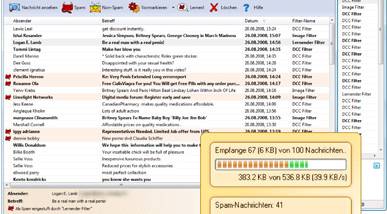

Spamihilator is an email filtering program that sits between a mail client and an email server, examining incoming messages before they reach the inbox. It is intended for people who use POP3 or IMAP email and want to separate unsolicited mail from legitimate messages without changing their usual mail client. Filtering runs in the background, and the program works with a range of clients that support these protocols.
Spamihilator combines several filters to identify junk mail. Its Bayesian Learning Filter estimates the likelihood that a message is spam and can be trained using examples of spam and legitimate email. The Spam Word Filter checks for configured terms, while the Link, DCC and Rule filters provide additional ways to assess messages. Users can add words and regular expressions to their own rules, then adjust filter settings to suit their inbox and reduce unwanted classifications.
Messages identified as spam are kept in Spamihilator's Recycle Bin instead of being passed to the mail client. This provides a place to review filtered messages and restore any that were caught by mistake. The Training Area lets users mark messages as spam or non-spam so the learning filter can adapt to their mail. A friends list allows trusted senders through without filtering, while a blocked-senders list ensures mail from specified addresses is rejected. Spam from blocked senders can also be deleted directly from the server without first downloading it.
The program supports POP3 and IMAP accounts and can use SSL/TLS when the email server supports secure connections. A setup wizard helps configure a mail client to work through Spamihilator. Plugins can extend the filtering options or add other functions, making the program adjustable for different email setups. These tools are useful for keeping routine personal or work correspondence separate from bulk and unsolicited mail while retaining control over messages that need review.
Spamihilator is freeware for Windows, with support listed through Windows 10. It is designed for incoming email and depends on accounts using POP3 or IMAP; it is not a replacement for an email client. Its filtering, sender lists and review area operate together in the background, while users can revisit the Recycle Bin and Training Area when they need to correct a decision or refine future filtering.