System Ninja Portable
System Ninja Portable is a Windows maintenance utility for removing unnecessary files and managing a few common system tasks. Its portable format is suited to users ...

System Ninja is a Windows maintenance utility that scans for unnecessary files and provides tools for managing startup entries and running processes. Its file cleaner helps users review and remove clutter to recover disk space. A separate P3P Registry History cleaning tool handles that category of stored history. The program is freeware and requires the .NET Framework 3.5.
| Author: | The Web Atom |
| License: | Freeware |
| Price: | FREE |
| Released: | Apr 19, 2017 |
| File size: | 2.30 MB |
| Downloads: | 455 |
| Keywords: | windows startup manager, Windows 10 compatible, Startup, Cleaner, pc cleanup software, Process, Startup Manager, System Ninja, junk file cleaning, Process Manager, System optimization, junk file cleaner, process management, registry history cleaner, system ninja cleaner, The Web Atom, process manager utility |
| Author URL: | http://thewebatom.net/ |
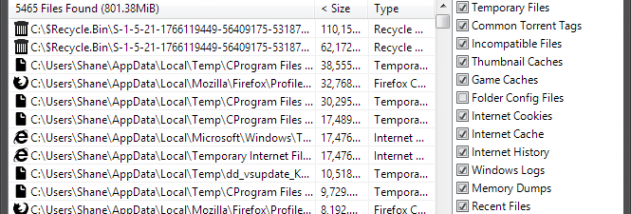

System Ninja is a Windows maintenance utility for users who want to remove unnecessary files and manage a few common system tasks from one program. Its main tool scans the computer for files it considers safe to delete, helping recover disk space and clear out accumulated clutter. The program also includes tools for controlling startup entries, viewing and managing running processes, and cleaning P3P registry history.
The file cleaner checks selected areas of the system for removable files. After a scan, users can review the results and remove unwanted items rather than searching through folders manually. This makes it useful for routine cleanup when temporary or otherwise unnecessary files have built up. Removing files can free storage, though the amount recovered depends on the computer and its contents.
The Startup Manager provides a place to review programs configured to launch when Windows starts. Disabling unneeded startup entries can reduce the number of applications that load during startup. The Process Manager gives users access to running processes, allowing them to inspect and manage active applications and background tasks. These tools are intended for users who want more control over what runs on their system.
A separate P3P Registry History cleaning tool targets that category of stored history. Together, the cleaner and management utilities cover basic maintenance tasks without requiring separate applications for each function. System Ninja is suited to occasional cleanup, checking startup behavior, and reviewing active processes; it is not a replacement for careful system administration, and users should verify items before removing files or changing startup settings.
The program is freeware and requires the .NET Framework 3.5. It is a Windows utility, with the supplied operating-system information including Windows 10. Users should ensure the required framework is available before running it.