BabelEdit
BabelEdit, developed by Andreas Loew, is a powerful and intuitive localization management tool designed specifically for developers and translators. This Windows 10 software streamlines the ...

TexturePacker x64 packs image assets into sprite sheets and exports companion data for frameworks such as Cocos2D, Sparrow, Corona SDK, LibGDX and LimeJS. It offers GUI and command-line workflows, automated trimming and sizing, edge extrusion, and layout algorithms for different asset types. Color reduction and dithering help manage texture memory and image quality.
| Author: | Andreas Loew |
| License: | Demo |
| Price: | $39.99 |
| Released: | Apr 15, 2024 |
| File size: | 27.30 MB |
| Downloads: | 387 |
| Keywords: | sprite packer, x64 sprite creation, sprite sheet generator, x64 pack texture, game development tool, x64 sprite, x64 texture, game asset optimization, x64 packer, Andreas Loew, image optimization software, sprite sheet maker, TexturePacker x64, texture atlas tool, x64 image optimization, sprite sheet generation, texture atlas creator, texture packing software |
| Author URL: | https://www.codeandweb.com/ |
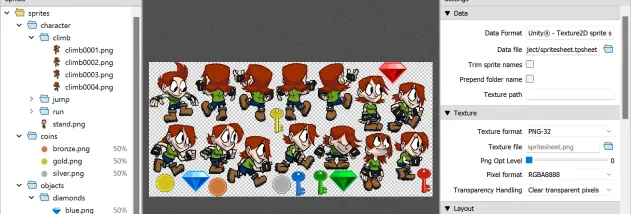

TexturePacker x64 is a sprite-sheet and texture-atlas tool for developers preparing image assets for games and other graphics-driven applications. It combines a graphical interface with command-line operation, letting artists arrange sprites visually while build systems can regenerate sheets as source assets change. Its workflow is intended to reduce the amount of manual image placement and keep exported artwork and metadata aligned with a project's assets.
The program packs multiple images into a larger sheet and can generate companion data files for supported frameworks, including Cocos2D, Sparrow, Corona SDK, LibGDX and LimeJS. Those files let an application identify and use individual sprites within the packed image. The Basic layout places sprites in rows and suits tile maps or simple animations that do not require an additional data file; sprites can be sorted by name, width, height or area. MaxRects aims for denser packing and supports rotation and trimming where the target framework allows them.
Automated trimming removes unused transparent margins, while automated sizing adjusts the sheet to fit its contents. Extrusion extends the pixels along each sprite's edges, helping prevent visual seams or flicker when textures are sampled or tiled. For mobile and other memory-conscious projects, color reduction can convert RGBA8888 artwork to RGBA4444, cutting texture memory use by half. Dithering that preserves transparency can soften banding in gradients, though it may add a subtle grain-like appearance.
TexturePacker can be integrated into a build toolchain so changes to files in an asset folder trigger a fresh sprite sheet when the project is rebuilt. The command-line workflow is useful for repeatable asset generation, while the GUI provides direct control over layout and export settings. The program also supports the PVR.CCZ texture format used by Cocos2D, including workflows with 16-bit textures.
TexturePacker x64 is distributed as demo software and is aimed at developers working with sprite-based games and applications. The provided platform information covers 64-bit Windows systems, including Windows 10 and Windows 11. Export choices and packing options depend on the framework and project requirements, particularly when using rotation, trimming or reduced-color output; these should be checked against the application's asset-loading pipeline.