TimeSage Timesheets Pro Edition for Windows 10 - Full description
TimeSage Timesheets Pro Edition is a time-tracking and timesheet tool for people who need to record work across projects and prepare hours for payroll or billing. It combines a start/stop clock with editable timesheets, project profiles and configurable rules, making it suitable for freelancers, employees and small teams that need more detail than a basic timer provides.
The start/stop clock records work as it happens, and can be controlled from the Windows system tray or with a configurable hotkey. Entries can span midnight or multiple days, which helps with overnight shifts and extended jobs. For hours entered or corrected manually, built-in validation detects overlapping time entries and signals possible collisions. Entries can also be reordered or merged, so a timesheet can be tidied after work is recorded without losing the ability to review individual periods.
The program supports multiple timesheets, projects and project profiles. Profiles can be set up around different conventions or roles, including separate profiles for users working in a shared environment. Notes provide a place to retain context alongside recorded time. Custom work-time frames can distinguish regular hours, breaks, overtime and weekends; configured salary rules then support automatic calculations for different payment arrangements. These options also let users organize time for billing rather than payroll.
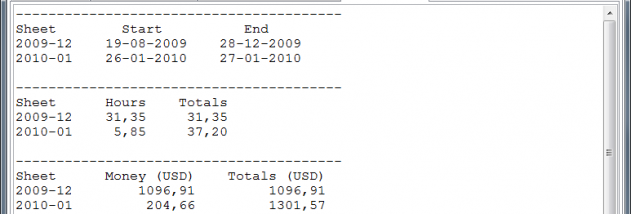
TimeSage includes graphs and statistics for reviewing recorded hours, and imports and exports timesheets in CSV, XML and HTML formats. Exporting makes it possible to move time records into other tools or share them, while importing can help bring existing records into a timesheet workflow. Users can create new projects and sheets according to their preferred conventions, then correct or complete entries with validation before reviewing totals.
TimeSage Timesheets Pro Edition is trialware for Windows, with compatibility information covering Windows XP through Windows 10. Its project profiles, manual editing tools and configurable time frames suit both regular timesheet keeping and work arrangements with varied shifts or pay rules. Because accurate payroll and billing depend on the rules configured and the quality of recorded entries, users should review settings and totals before relying on calculated figures.