
VrmlPad

VrmlPad 3.0

VRML editor with visual scene tools

VrmlPad is a VRML editor for developers building and maintaining interactive 3D scenes. It combines syntax highlighting, Smart AutoComplete, dynamic error detection, field validation and an integrated script debugger with visual tools for browsing the scene tree, managing resources and viewing node thumbnails. Users can preview individual nodes and complete scenes, edit materials, inspect routes, save workspace arrangements and prepare content with a publishing wizard. Automation and scripting support repeatable tasks.

VrmlPad 3.0 details

Author:
License: Trialware
Price: $150.00
Released:
File size: 983 kB
Downloads: 278
Keywords: x64 software, vrml editor, vrml syntax highlighting, VrmlPad, Windows 10, VRML, ParallelGraphics, 3D modeling tool, editor, VRML editor, script, vrml programming, VRML programming, vrml scene editor, vrml script debugger, vrml scene preview
Author URL: https://www.cortona3d.com/
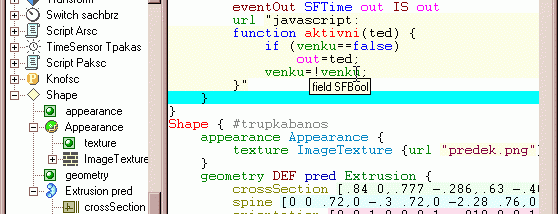
VrmlPad screenshot
VrmlPadSource EditorsWindows 2000, Windows 2003, Windows XP, Windows Vista, Windows Vista x64, Windows 7, Windows 7 x64, Windows 8, Windows 8 x64, Windows 10, Windows 10 x64

User Rating: 1.9 (8 votes)

Windows 10

x32

Windows 10

x64

VrmlPad Awards

Windows 10 download editor's pick

VrmlPad for Windows 10 - Full description

VrmlPad is a VRML editor for developers creating and maintaining interactive 3D scenes for the web. It combines source editing with visual tools for inspecting scene structure and resources, helping users work with both VRML code and the nodes that make up a scene.

The editor provides syntax highlighting, Smart AutoComplete and dynamic error detection. These features help identify code structure while typing and surface problems during editing. A fields validation macro checks VRML fields, while the integrated script debugger supports investigating scripts that control scene behavior. Advanced find and replace helps locate or update text across a project.

Visual scene tools make it possible to examine and manage the scene tree, fold nodes to reduce clutter, and view thumbnails or previews of individual nodes. A routing map offers a view of connections between scene elements, and resource operations support work with files used by a VRML project. The visual material editor provides an interface for editing materials, while scene preview lets developers inspect the rendered result without leaving the editor.

Workspace arrangements can be saved for continued work, and automation and scripting support repeatable editing tasks. A publishing wizard assists with preparing VRML content for distribution. Together, these tools suit developers building scenes, editing existing VRML projects, debugging interactive behavior, and checking assets and materials as they work.

VrmlPad is commercial trialware from ParallelGraphics for Windows. It is intended for VRML programming rather than general-purpose text editing and combines code-focused features with visual scene inspection in one desktop application.

VrmlPad for Windows 10 - Post your review