XML Explorer Portable for Windows 10 - Full description
XML Explorer Portable is a lightweight desktop viewer for opening and exploring XML documents. It is intended for developers, testers, and anyone who needs to inspect structured XML without editing it in a full development environment. Its focus is quick navigation through document content, including files that are too large for many basic text editors to handle comfortably.
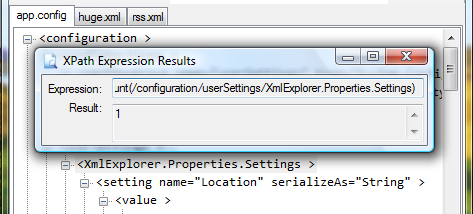
The program displays XML in a formatted, navigable form and can copy formatted XML data for use elsewhere. XPath evaluation lets users enter an expression and inspect the matching information in a document, which is useful for checking element paths or locating particular values. Frequently used XPath expressions can be saved in an expression library and reused later, much like bookmarks, rather than being retyped for each document.
For documents that must conform to a schema, XML Explorer can validate against an XSD specified in the document. It presents validation errors in a list; double-clicking an error takes the user to the corresponding node and selects it, making it easier to identify the relevant part of the XML. Multiple documents can remain open in tabs, which can be closed with a middle-click. Dockable panes provide a Visual Studio-style workspace that can be arranged around the current inspection task.
These tools suit tasks such as reviewing data exports, checking XML configuration files, tracing document structure, testing XPath queries, and finding schema violations. The viewer has been tested with XML files as large as 300 MB, so it can be useful when a file is impractical to inspect in a simple editor. Its functions are oriented toward viewing, exploration, copying, querying, and validation rather than general-purpose XML authoring.
XML Explorer is open-source software from Jason Coon and is offered as a portable application. The supplied system support includes Windows versions through Windows 10, including 64-bit editions where indicated. Its small download size makes it a compact option for focused XML inspection on a Windows PC.