Zed Axis
Zed Axis is a Windows utility for transferring transaction records from spreadsheets and text files into a QuickBooks company file. It is intended for businesses ...

Zed Axis 64bit imports transaction data from Excel, CSV, tab-delimited, and XML files into a QuickBooks company file. It supports records such as invoices, sales receipts, bills, payments, purchase orders, journal entries, and time entries. Users map source columns to QuickBooks fields, preview and edit transactions, and validate data before importing. Saved mappings can include constant values, and the utility can create missing customers, vendors, items, jobs, or employees.
| Author: | Zed Systems |
| License: | Trialware |
| Price: | $195.00 |
| Released: | Dec 6, 2012 |
| File size: | 14.26 MB |
| Downloads: | 298 |
| Keywords: | Zed Systems, bill x64, Windows 10 compatible, QuickBooks integration, quickbooks excel importer, quickbooks invoice import, credit x64, import transactions to quickbooks, payment x64, QuickBooks x64, quickbooks csv import, invoice x64, Excel x64, 64bit software, transaction x64, sale x64, quickbooks import tool, accounting data import, data import/export, Zed Axis |
| Author URL: | http://www.zed-systems.com |
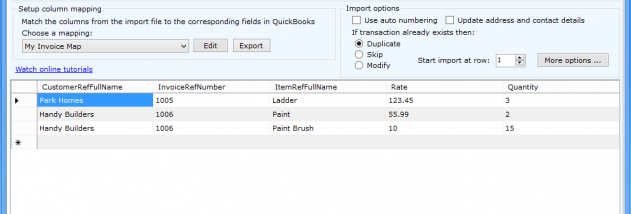

Zed Axis 64bit is a Windows utility for moving transaction data from spreadsheets and text files into a QuickBooks company file. It is intended for businesses and accounting teams that receive transaction details in bulk and want to avoid entering each record by hand. The program connects imported rows with QuickBooks transaction fields through a configurable column-mapping step, allowing data prepared in another system to be used in QuickBooks.
The importer accepts Excel spreadsheets, comma-separated or tab-delimited text files, and XML files. It handles a broad range of transaction records, including invoices, sales receipts, sales orders, estimates, customer payments, deposits, purchase orders, bills, vendor credits, cheque and credit-card payments, inventory adjustments, time entries, journal entries, and price-level lists. After selecting a source file and transaction type, users map its columns to the relevant QuickBooks fields. This makes the same workflow useful for different layouts and kinds of accounting data, rather than requiring a fixed spreadsheet template.
Mappings can include constant values, such as a date or class, to apply the same information to every transaction in an import. Saved mapping settings can retain these choices for later batches. Axis can also create customers, vendors, items, jobs, or employees that are missing from QuickBooks during an import. Before committing records, users can preview the transactions and make edits. Validation checks whether the data is in a format QuickBooks can accept, giving users an opportunity to correct detected problems before trying again.
If an import encounters rejected rows, the error log identifies the issue and the affected data, so those records can be reviewed and retried separately instead of repeating the entire batch. These checks and review steps are useful when consolidating sales, billing, purchasing, payment, or time data from external spreadsheets and business systems. Bulk processing is particularly suited to recurring imports or large files where manual entry would be slow and prone to transcription errors.
Zed Axis 64bit is trialware and is intended for 64-bit Windows systems. The stated operating-system support includes Windows Vista, Windows 7, and Windows 8 in their 64-bit editions. The import process works with QuickBooks company files and supports the file formats noted above; it is not a general-purpose spreadsheet editor or accounting package.