Actual Window Rollup
... making this a compact alternative to switching between minimized programs in the taskbar. The main controls are a Roll Up button added to the window title bar and ...

Actual Window Menu extends the standard Windows system menu with extra controls for managing open windows. It can minimize applications to the notification area or a floating desktop icon, roll windows up, apply transparency, keep them above others, and resize or align them. Multi-monitor users can move windows between displays, while per-application settings let them choose which commands appear.
| Author: | Actual Tools |
| License: | Shareware |
| Price: | $24.95 |
| Released: | Jul 2, 2026 |
| File size: | 8.53 MB |
| Downloads: | 412 |
| Keywords: | keep window always on top, system menu, Windows 10 software, transparency, run, transparent, Actual Window Menu, multi monitor window manager, user-friendly interface, roll up windows, priority, x64 application, Actual Tools, stay always on top, advanced window management, window transparency tool, multi-monitor, roll up, window management menu, tray, window menu, translucent, minimize to system tray, minimize, unroll |
| Author URL: | http://www.actualtools.com/ |
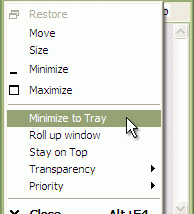

Actual Window Menu adds extra window-management commands to the standard system menu on Windows. It is intended for people who work with many open applications or need more control over window placement and visibility than the usual minimize, move, size and close commands provide. The added options appear alongside familiar controls, so they can be used from each window rather than through a separate management interface.
Windows can be minimized to the notification area or represented by a floating icon on the desktop. These alternatives help keep less-used applications out of the taskbar while leaving them available to restore when needed. A roll-up command collapses a window so that its title bar remains visible, and can expand it again later. The menu also offers controls for making windows semi-transparent, keeping them above other windows, resizing them and aligning them on screen.
For systems with multiple displays, the menu can move windows between monitors, which is useful when arranging applications across a larger desktop. It can also change the execution priority of a Windows process while it is running. The available commands can be customized for individual applications, allowing users to show only the functions relevant to a particular program instead of adding every option everywhere.
These tools suit workflows that involve frequent switching between applications, crowded taskbars or repeated window rearrangement. For example, a user can move a reference window to another display, keep a small utility above a document, or tuck an inactive application into the notification area. Because the commands are integrated into each window's system menu, the workflow remains close to standard Windows window controls.
Actual Window Menu is shareware from Actual Tools. It is offered for Windows, including Windows 10 and Windows 11, as well as several earlier Windows releases. The stated minimum requirements are a Pentium III 600 MHz processor, 512 MB of RAM and 10 MB of free disk space. The interface is available in multiple languages, including English, German, French, Spanish, Italian, Dutch, Portuguese, Russian and Polish.