Actual Virtual Desktops for Windows 10 - Full description
Actual Virtual Desktops is a desktop organization utility for people who keep several applications open while working on different tasks. It creates multiple independent virtual desktops within Windows, letting users group windows by activity instead of keeping every program on one crowded screen. A desktop can hold the applications for a particular project or type of work, while other desktops keep unrelated windows out of view until they are needed.
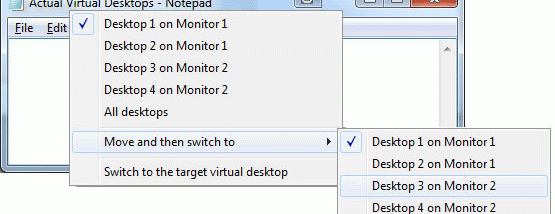
Users can create as many desktops as their workflow requires and move application windows between them manually. For automatic organization, they can define rules that send specified windows to a chosen desktop when those windows launch. This is useful for keeping recurring tools in a consistent workspace without sorting them each time. Windows can also be managed through additional controls integrated into their title bars and system menus, or with customizable hotkeys.
Each desktop can have its own wallpaper, making workspaces easier to distinguish at a glance. Custom hotkeys provide another way to switch directly between desktops. The program supports running Windows system utilities and other applications in the virtual desktop environment, so users can keep familiar tools available while separating their windows by task. Its combination of manual controls and launch rules suits both people who prefer to arrange windows themselves and those who want routine placement handled automatically.
Typical uses include separating work projects, communication tools, research, and personal tasks into distinct workspaces. Instead of minimizing or closing windows to reduce clutter, users can switch to a desktop containing only the applications relevant to the current activity. This can make a busy computer easier to navigate, particularly when several tasks require different sets of open programs.
Actual Virtual Desktops is shareware from Actual Tools and supports Windows 10 and Windows 11, as well as earlier Windows releases. The program is available in multiple languages, including English, German, French, Spanish, Italian, Dutch, Portuguese, Russian, and others. Its stated requirements include a Pentium III 600 MHz or faster processor, at least 512 MB of RAM, and 10 MB of free disk space.