Adobe Acrobat XI Pro
Adobe Acrobat Pro is a desktop application for creating, editing, converting ... source document or graphics. For larger editing tasks, Acrobat can export PDFs to editable Microsoft Word, Excel ...

Adobe Acrobat Pro combines PDF viewing with tools for editing, organizing, and sharing documents. It can combine files, arrange pages, export PDFs to other formats, add comments, fill forms, and apply digital signatures. Scanning and OCR support paper-to-digital workflows, while bookmarks, zoom, and printing cover everyday reading. Cloud-based document review requires an Adobe account.
| Author: | Adobe |
| License: | Trialware |
| Price: | $14.99 |
| Released: | Oct 15, 2026 |
| File size: | 1.30 MB |
| Downloads: | 1373 |
| Keywords: | Document conversion, PDF editing, pdf editor, combine, convert pdf files, combine PDFs, Adobe Systems, splitter, create PDF, pdf scanner ocr, Digital signatures, organize pdf pages, sign pdf documents, optimize PDF, Interactive forms, watermark, combine pdf files, Adobe Acrobat Pro |
| Author URL: | https://acrobat.adobe.com/us/en/acrobat/pdf-reader.html |

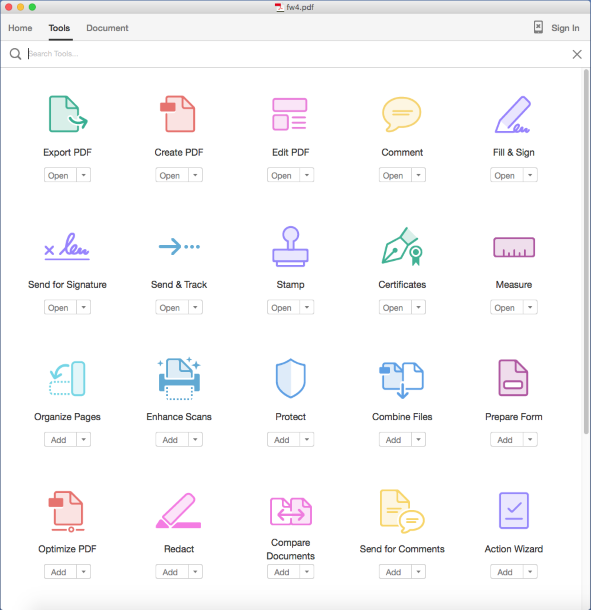



Adobe Acrobat Pro is a desktop PDF reader and document toolkit for people who need to create, review, organize, and revise PDF files. It brings reading and document-management tools together in one application, with a home screen for opening recent files stored on a computer or accessed through Adobe's cloud service. Its range of editing and sharing functions suits both individual document work and collaborative review.
Acrobat Pro can combine multiple files into a single PDF, rearrange or organize pages, and export PDFs to other file formats. These tools help prepare documents for distribution or adapt existing files for further editing. Users can add comments for proofreading and review, fill in form fields, and apply digital signatures using secure keys. Basic reading functions include bookmarks, magnification, and print controls, so the same application can handle routine viewing as well as more involved document changes.
For working with paper documents, the program includes scanning and OCR tools in its create-and-edit workflow. OCR can make scanned pages more useful as digital documents by recognizing their text. Forms and signature functions are grouped around document completion and approval, while page and file tools support organizing material before it is shared. A categorized interface helps users locate functions according to the task at hand, and recently opened documents provide a starting point for returning to active work.
Acrobat Pro can also support shared review: documents may be made available for adjustments and comments through Adobe's online services, which require an account. This is useful for proofreading, collecting feedback, and moving a document through a review or signing process without treating each task as a separate file operation. Local files remain accessible through the application as well, making it suitable for a mixture of offline document work and cloud-based collaboration.
The program is offered as trialware and is intended for Windows computers. Its supported systems include Windows 10 and Windows 11, along with several earlier Windows releases and Windows Server editions. The toolset is aimed at users who need more than a PDF viewer, particularly those who regularly prepare, sign, scan, convert, or review documents. Availability of cloud collaboration features depends on an Adobe account and online access.