Windows 10 Codec Pack
Welcome to the home of the Windows 10 Codec Pack, a comprehensive suite of codecs brought ... Limited. This software is a must-have for every Windows 10 user seeking an effortless multimedia experience. The Windows ...

Aegisub is an open-source editor for creating, timing and styling subtitles. Its subtitle grid shows each line's text and start and end times, while an edit box is used to revise selected lines. Video preview and audio waveform or spectrogram views help check synchronization. It supports formats including SRT, SUB, TTXT and ASS, and includes a spell checker with customizable dictionary entries.
| Author: | Rodrigo Braz Monteiro |
| License: | Open Source |
| Price: | FREE |
| Released: | Oct 18, 2026 |
| File size: | 46.90 MB |
| Downloads: | 492 |
| Keywords: | editor, subtitle spell checker, subtitle timing, Windows 10, edit, subtitle timing software, subtitle editing, subtitle, Rodrigo Braz Monteiro, subtitle synchronization, ass subtitle editor, subtitle typesetting, subtitle editor, srt subtitle editor, Aegisub, x64 software, open-source software |
| Author URL: | https://github.com/Aegisub |

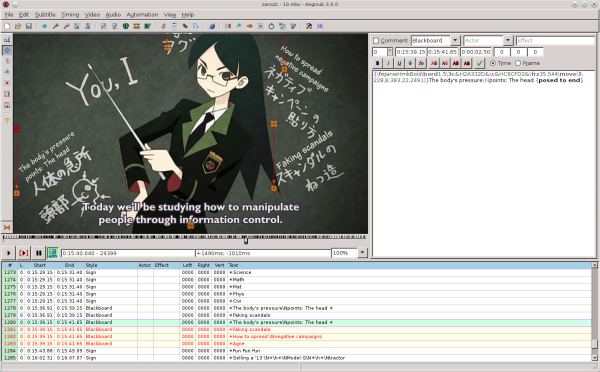


Aegisub is an open-source subtitle editor for people who create, revise, time and style captions for video. It is especially useful when plain text editing is not enough: subtitle lines can be organized alongside their timing and formatting, then checked against the video. The interface brings a subtitle grid and an edit box together, so users can review a sequence of lines and change the text or line properties without switching between separate documents.
The subtitle grid displays each line with its start and end times and text, making it practical to spot gaps, overlaps or misplaced dialogue in a sequence. The edit box is used to write and revise a selected line. Timing tools help adjust when a subtitle appears and disappears, while the video preview provides a way to check text against the corresponding scene. Audio waveform and spectrogram views help users place subtitle boundaries in relation to speech and other sounds, which is useful when synchronizing dialogue by ear rather than estimating from the picture alone.
Aegisub supports common subtitle formats including SRT, as well as formats such as SUB and TTXT. Its ASS support offers more control over presentation, including styled text and effects, making the program suitable for subtitles that need more than a uniform line of captions. The spell checker can flag likely spelling errors, and custom dictionary entries can accommodate names, specialist terms and slang. These tools help editors keep a subtitle track readable and consistent while working through many lines.
The program can be used to create subtitles from scratch, correct an existing track, retime captions after a video edit, or prepare styled dialogue for animation and other video projects. Editors can work through a file line by line, use the audio and video views to verify synchronization, and save the result in a suitable subtitle format. Its range of controls also makes it appropriate for subtitle typesetting work, though newcomers may need time to learn the dense interface and decide which tools are relevant to their workflow.
Aegisub is free and open source, and is available for Windows 10 and Windows 11 in 32-bit and 64-bit environments. It edits subtitle files rather than serving as a general-purpose video editor, so the finished captions are typically used with a compatible video player or production workflow. The feature-rich layout favors direct access to timing and styling controls over a minimal interface, making it a practical choice for users who need precise subtitle editing.