BarChimes
... to the download page for BarChimes, an innovative Windows 10 software developed by Quikquak. BarChimes is a powerful and versatile tool designed to enhance your ...

AlltoWav converts MP3, FLAC, OGG, WMA, APE and TTA files to WAV. It supports batch conversion across different source formats, including entire folders and subfolders. Users can drag and drop files, queue tracks, choose an output path, and adjust encoder bitrate, channel, sample rate and quality settings. The program is trialware.
| Author: | A-PDF.com |
| License: | Trialware |
| Price: | $24.30 |
| Released: | Oct 28, 2017 |
| File size: | 7.10 MB |
| Downloads: | 232 |
| Keywords: | batch wav converter, A-PDF.com, ogg to wav converter, audio conversion, mp3 to wav, user-friendly interface, wav encoder settings, wav converter, flac to wav, high-quality output, audio folder converter, flac to wav converter, AlltoWav, flac2wav, ogg2wav, mp32wav, mp3 to wav converter, Windows 10 software |
| Author URL: | http://www.a-pdf.com/ |
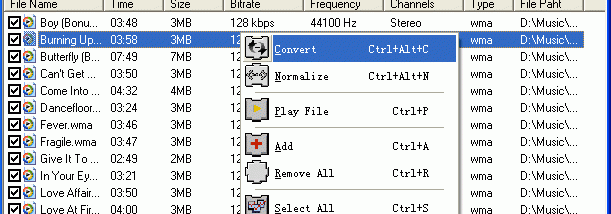

AlltoWav is an audio converter for people who need to turn compressed music files into WAV files, either individually or in larger collections. It accepts MP3, FLAC, OGG, WMA, APE and TTA sources, and writes WAV output using an audio encoder with configurable properties. Its batch-oriented workflow is useful for preparing music for applications or devices that require WAV, or for organizing a set of files in a consistent output format.
The conversion settings allow control over bitrate, channel configuration, sample rate and quality. These options let users choose how the output is encoded rather than relying on a single fixed profile. The appropriate settings depend on the intended use: channel and sample-rate choices can match a project's audio requirements, while bitrate and quality settings determine encoding parameters. The program converts supported compressed sources to WAV; it is not presented as a general-purpose audio editor or recording tool.
Files can be added by browsing the system, dragging and dropping them into the program, or selecting whole folders. AlltoWav can also include subfolders, which helps process a music library organized across multiple directories. Added tracks can be queued, and an output path can be specified before conversion, keeping the source collection separate from the resulting WAV files. Multiple source formats can be included in the same batch, so there is no need to convert each format in a separate run.
This makes the utility suitable for preparing batches of tracks for audio editing, production or playback workflows that accept WAV but not the original compressed formats. It can also help when a collection needs to be converted into one uncompressed audio format before being imported into another application. High-speed conversion is a stated design aim, though actual processing time depends on the files and computer.
AlltoWav is trialware. Its listed Windows support includes Windows XP, Vista, 7, 8 and 10, including the corresponding x64 editions where stated; Windows 11 support is not established here. The program is focused on file conversion, with no listed tools for editing, tagging or playing audio. Users should check that their required source format and output settings are covered before processing a large collection.