aTunes for Windows 10 - Full description
aTunes is a Java-based audio player and music library manager for people who want to play, sort and maintain a local collection in one desktop application. It handles common audio files including MP3, OGG, WMA, WAV, FLAC, MP4, M4A, RealAudio and CUE, and can also play online radio streams. Its library view organizes music by artist, album or genre, or lets users browse their folders directly.
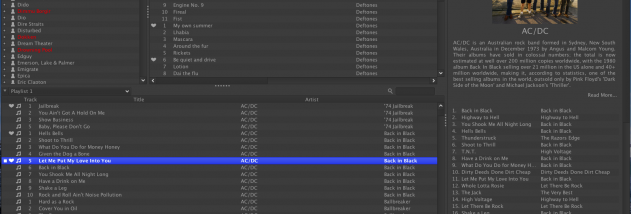
The navigator provides a tree of the collection, cover browsing and filters for finding artists, albums and genres. Separate search fields help narrow results in the navigator and in playlists. Playlists can contain large collections, run side by side and display sortable details such as title, artist, album, genre, duration and track number. Users can hide columns, filter a playlist, drag songs in from the library or file system, and open or save M3U files. Relative-path playlist saving can help keep a playlist usable when its music files are shared between computers.
Playback controls include shuffle, repeat, volume and mute, along with an equalizer, normalization, karaoke mode, hotkeys and an on-screen display. aTunes can read and write song ratings in tags, while its tag editor helps maintain track information. A multi-window layout lets users arrange the navigator, playlist and contextual information separately rather than keeping them in a single fixed view.
The application also connects music playback with online information. It can show lyrics and Last.fm details such as album information, other albums by an artist and similar artists; played tracks can be submitted to a Last.fm profile. Artist searches and related video links provide ways to look up further material. For physical media, the built-in CD ripper lets users choose which tracks to import and obtain track names automatically from Amazon. It uses external audio tools and supports several encoding options, depending on the tools installed.
aTunes is freeware and is written in Java, with support for Windows and other desktop operating systems. The supplied Windows compatibility information extends through Windows 10; Windows 11 compatibility is not established here. Some playback, ripping and online features rely on separate components or internet services, so their availability can depend on the local setup and service status. It suits listeners who need library organization, flexible playlists, audio playback and CD importing without using separate applications for each task.