Blue Cat's Widening Liny EQ x64
Blue Cat's Widening Liny EQ is a VST audio plug-in for engineers and producers who need precise tonal shaping with control over stereo placement. Its eight-band ...

Audio Repeater Pro routes an audio stream from a selected input device to an output device, helping connect hardware and software components on Windows. It provides controls for device selection, buffer settings and audio-level monitoring. Sample rate and bit depth can also be adjusted, while support for multiple concurrent streams suits recording, broadcasting and other setups with several audio sources.
| Author: | Ruchira Hasaranga (CrownSoft) |
| License: | Demo |
| Price: | FREE |
| Released: | Mar 1, 2025 |
| File size: | 2.80 MB |
| Downloads: | 245 |
| Keywords: | Transfer, Ruchira Hasaranga, Buffer, DSP Effect, download Audio Repeater Pro, real-time processing, sound routing, audio stream repeater, Transfer Audio, audio processing, transfer audio between devices, audio enhancement, DSP, Audio Repeater Pro, low latency, audio routing software, DSP Plugin, user-friendly interface, Repeat, audio buffer settings, software download, CrownSoft, sound routing utility, audio repeater pro, Audio Repeater Pro free download, audio routing, sound manipulation |
| Author URL: | https://www.audiorepeater.com/ |
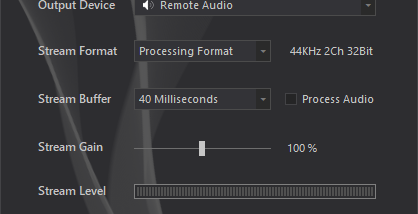


Audio Repeater Pro is a Windows utility for routing audio from one device to another. It is intended for people who need to pass sound between hardware or software components, including musicians, broadcasters, recording users and others managing multiple audio connections. By selecting an input and an output, users can set up a signal path without relying solely on a physical connection between devices.
The application provides controls for choosing audio input and output devices, then transferring the incoming stream to the selected destination. Buffer settings help tune the balance between responsiveness and stable playback: smaller buffers can reduce delay, while larger ones may help avoid interruptions on a busy system. Audio levels can be monitored during routing, making it easier to check that a signal is active and at an appropriate level.
Additional audio parameters, including sample rate and bit depth, can be adjusted to suit a particular setup. These controls are useful when connecting devices or applications with different audio requirements. The program is also designed to handle multiple audio streams concurrently, supporting workflows where more than one source needs to be routed or monitored. Its compact interface keeps device selection and key adjustments close at hand.
Typical uses include sending computer audio to another output device, connecting audio components during recording, and managing sound feeds in a broadcast or live-performance setup. The utility can also help hobbyists experiment with audio routing between available devices. The result depends on the audio hardware and drivers in use, so device choices and buffer settings may need adjustment for each system and task.
Audio Repeater Pro is distributed as demo software and is developed by Ruchira Hasaranga of CrownSoft. It is designed for Windows and supports Windows 10 and Windows 11, as well as Windows 7 and Windows 8 in 32-bit and 64-bit editions. Users should verify that their audio devices are available to Windows before configuring a route.