WonderFox DVD Ripper Pro
WonderFox DVD Ripper Pro is a Windows application for converting DVD ... device and another format for desktop playback. WonderFox DVD Ripper Pro includes DVD decryption functions intended to handle ...

BDtoAVCHD converts Blu-ray discs, Blu-ray folders and HD MKV files into AVCHD output for compatible players and disc playback. It calculates encoding parameters automatically, while allowing users to adjust resolution, bitrate, audio tracks and subtitles. The program can split output across multiple discs and uses multi-core processors to help speed encoding.
| Author: | Joel Gali |
| License: | Adware |
| Price: | FREE |
| Released: | Dec 23, 2025 |
| File size: | 44.60 MB |
| Downloads: | 281 |
| Keywords: | Blu-ray conversion, blu-ray to avchd converter, Blu-ray to AVCHD, Blu-ray ripper, DVD5/DVD9 compatibility, Joel Gali, Ripper, AVCHD format, blu-ray video converter, mkv to avchd, BDtoAVCHD, convert blu-ray folder, High-definition video processing, Converter, BD to AVCHD, hd video to avchd, Encoder, avchd authoring software |
| Author URL: | https://www.connecta2000.com/ |

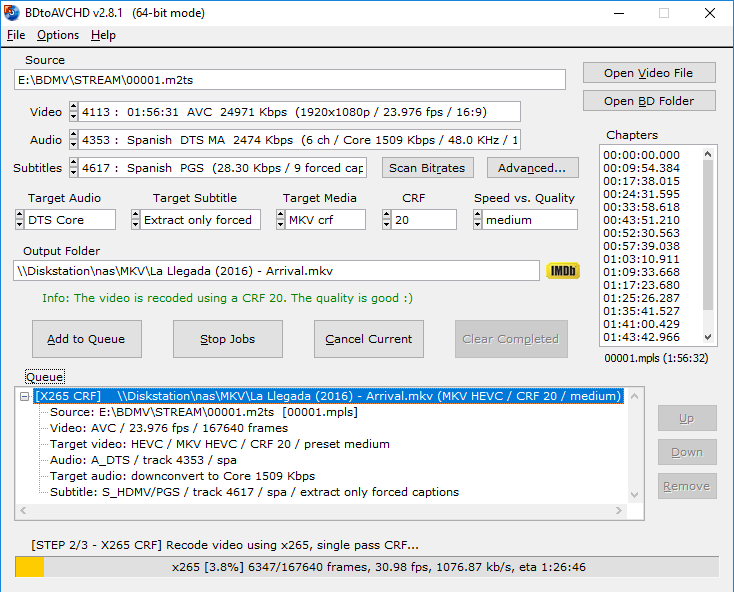


BDtoAVCHD is a Windows video conversion and authoring utility for people who want to turn Blu-ray sources or HD MKV files into AVCHD output. AVCHD is a high-definition video format used for disc playback, so the program can help prepare video for compatible Blu-ray players and other devices. It is also useful for making smaller copies of high-definition material while retaining its picture quality as much as the chosen encoding settings allow.
The program accepts Blu-ray discs, Blu-ray folders and MKV files as input. During conversion, it calculates encoding parameters for the selected source and output, reducing the need to configure every technical value manually. Users can adjust settings when they want more control, including output resolution and bitrate. These options let them balance file size against image quality according to the intended disc or playback setup.
Audio tracks and subtitles can be selected for the output, which is useful when a source contains multiple languages or subtitle streams. BDtoAVCHD can also split output across multiple discs when a project is too large for one, helping organize longer or higher-bitrate content. Its multi-core processor support is intended to make encoding more efficient on systems with multiple CPU cores, though processing time depends on the source, settings and computer.
The resulting AVCHD files or disc structures are intended for playback on compatible Blu-ray players and PlayStation consoles. Typical uses include preparing a Blu-ray backup, converting an HD MKV for disc-based playback, or fitting high-definition video into a more manageable output size. Compatibility depends on the player and the way the output is authored, so checking the target device's AVCHD support is sensible before preparing a large batch.
BDtoAVCHD is developed by Joel Gali and is distributed as adware. It runs on Windows 10 and Windows 11, as well as earlier Windows releases. The interface is designed to keep the basic conversion workflow accessible while exposing encoding controls for users who want to fine-tune their output.