Portable CDBurnerXP
Portable CDBurnerXP is a free disc-burning utility for users who ... for use without a conventional installation. For data discs, CDBurnerXP can compile files and folders for burning, then ...

CDBurnerXP is a free Windows utility for burning data CDs and DVDs, including double-layer discs, and creating audio CDs. It can verify written data, make bootable discs, import existing sessions and save compilations for later. Additional tools create, burn and convert ISO images, copy data discs, erase rewritable media, extract music and edit ID3 tags.
| Author: | Canneverbe Limited |
| License: | Freeware |
| Price: | FREE |
| Released: | Nov 18, 2019 |
| File size: | 5.10 MB |
| Downloads: | 1408 |
| Keywords: | cd burner, disc burner, burner, CDBurnerXP, create iso image, Canneverbe Limited, burn cd, burn, disc burning software, multimedia creation, dvd burning software, Windows 10 compatible, CD Burner XP, burn audio cd, disc burning utility, burn iso to disc, x64 architecture, create |
| Author URL: | http://www.cdburnerxp.se/ |


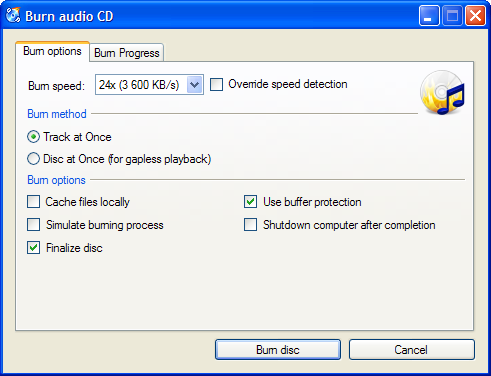

CDBurnerXP is a free Windows application for writing data and music to optical discs and working with disc image files. It is intended for people who need to create backups, distribute files, assemble audio CDs or copy discs using a computer's optical drive. Its start-up wizard offers separate paths for data discs, audio CDs and music extraction or tag editing, helping users choose a suitable project before adding files.
For data projects, files can be added through the built-in browser or dragged from Windows Explorer. The program writes CDs and DVDs, including double-layer media, and can create MP3 discs that hold many audio files. It can make bootable discs, save compilations for later use and verify written data after burning. Existing ISO 9660 sessions can be imported to extend a disc's file structure, while quick or full erase options prepare rewritable media for reuse. Disc-copying tools can duplicate data discs but do not bypass copy protection.
Audio CD projects can be assembled from MP3, WAV, OGG and WMA files, or by adding tracks directly from an existing audio CD. An integrated player helps check audio before burning, and M3U and WPL playlists can be imported to build a compilation. Disc-at-once mode supports gapless playback between tracks, while optional gaps can be used where pauses are preferred. The program also provides music extraction and ID3 tag editing for organizing audio files.
CDBurnerXP can burn ISO images, create ISO files from compilations and save CDs or DVDs as ISO images. It converts BIN and NRG image files to ISO, reports information about a recorder and inserted disc, and includes basic cover printing for data and audio discs. Burning can be performed on-the-fly, with buffer-underrun protection intended to reduce interruptions during writing. Supported drive connections include IDE, USB, FireWire and SCSI.
The software has a multilingual interface and is freeware for personal and business use, with no adware included. It supports a range of Windows editions through Windows 10 and works with compatible optical drives and recordable or rewritable media. The wizard is central to starting projects: users select a project type before creating or opening a compilation. This makes it suited to common disc-burning and ISO tasks without requiring a separate utility for each format.