ChilkatZip for Windows 10 - Full description
ChilkatZip creates self-extracting Windows EXE files from ZIP archives. It is intended for people distributing files who want recipients to unpack an archive by running a program, without installing separate ZIP extraction software. The resulting EXE contains both the ZIP data and the extraction software, so it can be shared as a single file. This is useful for distributing application files, documents, or other bundled content to users with varying levels of technical experience.
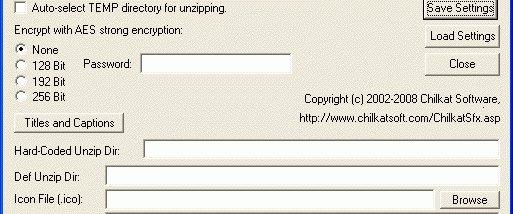
For archives that need protection, the utility can encrypt their contents with AES at 128, 192, or 256 bits. The recipient must enter the password used when the EXE was created to extract the files. ChilkatZip also uses streaming compression and encryption, allowing it to process ZIP files up to 4 GB without requiring the entire archive to fit in memory. The extraction process displays a progress bar, giving recipients a visible indication of its progress when unpacking larger bundles.
The creation process can be automated from a DOS command line or batch file by supplying a ZIP filename, with customization options passed as command-line arguments. This supports repeatable packaging workflows and unattended generation of self-extracting files. A package can also be configured to launch a setup EXE after extraction, optionally passing predefined arguments to the installer. For presentation and extraction behavior, the creator can embed a custom icon, set the title and progress caption, and choose either a fixed extraction directory or a temporary directory selected at runtime.
ChilkatZip supports international filenames through a command-line code-page option, which helps preserve names written in scripts beyond basic English. Its combination of password-protected archives, unattended creation, and post-extraction setup launching suits software distribution as well as delivery of organized file bundles. Recipients do not need a separate unzip utility, while the person preparing a package can tailor its appearance and extraction destination.
ChilkatZip is freeware from Chilkat Software, Inc. The supplied platform information includes Windows 10 and earlier Windows releases; it does not establish support for Windows 11. The creator uses ZIP files as its input and produces Windows self-extracting EXE files as its output. Passwords should be shared with recipients through an appropriate separate channel when archive contents are sensitive.