Core Temp 64bit for Windows 10 - Full description
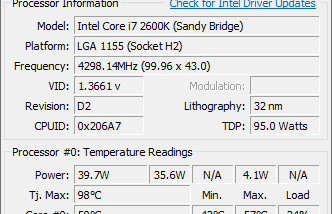
Core Temp is a lightweight Windows utility for checking processor temperature and related CPU readings. It is intended for users who want to observe thermal behavior during everyday work, gaming, or other demanding tasks, and for anyone troubleshooting heat or cooling issues. Rather than relying on a single motherboard sensor, it reads the Digital Thermal Sensors built into supported processors and can show a separate temperature for each core.
The main window displays live core temperatures, making it possible to compare readings across a processor and watch them change as workloads rise or fall. This can help identify whether temperatures increase during a particular task, whether one core behaves differently from others, or whether cooling changes have an effect. Readings are processor-specific, so the utility can work across different motherboard models when the CPU provides supported sensor data.
Core Temp also presents other vital processor information and is designed to remain compact while running in the background. Its plug-in platform lets third-party developers add functions, so the basic monitoring tool can be extended without replacing it with a larger hardware suite. A separate gadget has offered a graph view for processor temperature or load and memory use, with adjustable colors and a resizable layout; availability and suitability of add-ons may vary by Windows setup.
The utility is useful for checking temperatures during stress tests, tracking changes under normal workloads, and confirming that a processor is not overheating. Its per-core view can provide more detail than a single system-wide temperature reading, while real-time monitoring helps users relate heat to CPU activity. It supports compatible x86 processors from Intel, AMD, and VIA, including families with integrated Digital Thermal Sensors; exact support depends on the processor model and sensor implementation.
Core Temp is freeware for Windows, including 64-bit Windows systems. It is a focused temperature monitor rather than a complete system-tuning or cooling-control package, and it does not replace careful interpretation of hardware readings. Users can keep it open while working or check its readings when diagnosing thermal behavior; features beyond the core monitor depend on compatible plug-ins or companion components.