CPU-Z ROG
Discover the power of your system with CPU-Z ROG, a specialized tool developed by CPUID that elevates your hardware monitoring experience. Designed for enthusiasts and gamers alike, this ...

Argus Monitor runs in the background to check hard-disk S.M.A.R.T. attributes and temperatures, warning when critical values change or reach manufacturer thresholds. It also graphs hard-drive, GPU and individual CPU-core temperatures, and displays CPU core frequency. Stored drive-health readings help track disks that are connected only occasionally. The utility is designed to flag possible problems early; it does not replace backups or repair a failing drive.
| Author: | Argotronic UG |
| License: | Trialware |
| Price: | $14.95 |
| Released: | Oct 18, 2026 |
| File size: | 14.50 MB |
| Downloads: | 557 |
| Keywords: | cpu frequency monitor, hard drive temperature, temperature, CPU speed, CPU monitor, cpu temperature monitor, smart disk alerts, HDD temperature, Argotronic UG, Argus Monitor, hard drive health monitor, CPU, gpu temperature monitor, hardware monitoring, hard drive temperature monitor, fan speed control, system health tracking, HDD |
| Author URL: | https://www.argusmonitor.com/ |


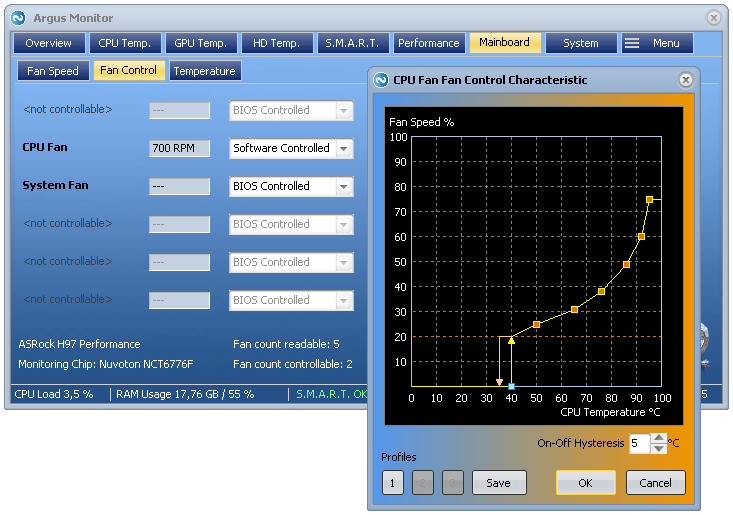



Argus Monitor is a Windows hardware monitoring utility for people who want to keep track of drive health and system temperatures while their PC is running. It works in the background, checking hard disks and displaying temperature readings for storage devices, the CPU and GPU. Its drive-health alerts can help users spot warning signs early enough to review backups and take action before a disk failure disrupts their work.
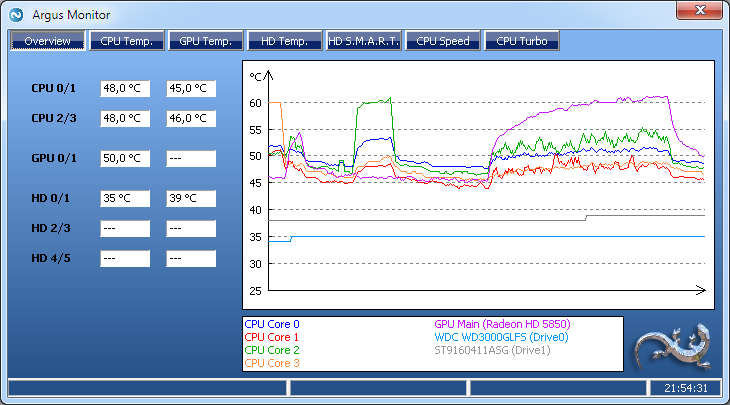
For hard disks, Argus Monitor checks critical S.M.A.R.T. attributes, the diagnostic values reported by a drive about its condition. It warns when an attribute changes or reaches a threshold set by the drive manufacturer, which may indicate an increased risk of failure. The program also tracks drive temperature and presents it graphically, making it easier to notice sustained heat or changes over time. These warnings are indicators rather than guarantees, so they complement regular backups instead of replacing them.
Drive status is retained for disks that are connected only occasionally, such as removable or externally attached drives. This allows the program to take account of earlier S.M.A.R.T. readings when a drive returns to the monitored PC, including changes that may have occurred while it was connected elsewhere. That history can be useful for users who rotate storage devices or connect backup disks periodically, rather than leaving every drive attached continuously.
Argus Monitor also shows CPU temperatures separately for each processor core and provides a graphical view of GPU temperature. CPU core frequency readings help users see how processor speed changes during operation and check whether power management is affecting frequency as expected. Together, these views give PC owners a way to observe heat and processor behavior during everyday use or more demanding workloads, alongside the separate drive-health checks.
The program is trialware and supports Windows 11, Windows 10, Windows 8 and Windows 7, including 32-bit and 64-bit editions where stated. It is intended for desktop monitoring rather than disk repair: an alert points to a possible hardware issue, but users should preserve important files and consult drive diagnostics or replacement options when health warnings appear. Regular monitoring is most useful when paired with current backups and attention to unusual temperature or health readings.