Sony Vegas Movie Studio HD
Welcome to the download page for Sony Vegas Movie Studio HD, a top-notch video editing software developed ... high-quality videos with a professional touch. Sony Vegas Movie Studio HD offers a plethora of features that ...

Debugmode Wax is a freeware video compositing and effects editor for standalone projects or use as a plugin in compatible video editors. It combines unlimited video and audio tracks, 2D and 3D effects, transitions, graphics-card acceleration and support for third-party filters. Tools include animated masks, particle effects, 3D text and model import. Projects can be exported to video, audio and image formats.
| Author: | Satish Kumar |
| License: | Freeware |
| Price: | FREE |
| Released: | Apr 15, 2009 |
| File size: | 2.60 MB |
| Downloads: | 359 |
| Keywords: | compositing, Windows 10 compatible, video compositing, special effects creation, video effects editor, video compositing software, Maker, 3d text video editor, movie, wax, creator, Movie Maker, video particle generator, DebugmodeWax, plugins, Debugmode Wax, video plugin host, Movie creator, 2d and 3d video effects, Satish Kumar, x64 software, create movie |
| Author URL: | https://www.debugmode.com/ |
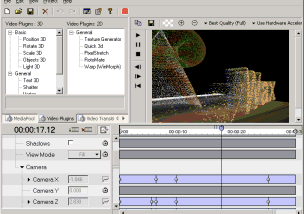

Debugmode Wax is a video compositing and effects editor for assembling footage, graphics and sound into layered sequences. It is aimed at home users and beginners working in the standalone application, as well as editors who want to add effects within a compatible non-linear video editor. Wax combines a timeline-based workflow with 2D and 3D compositing tools, so projects can range from simple overlays to sequences with animated masks, particles or 3D objects.
Projects can use unlimited video and audio tracks, arranged for top-down compositing. Multiple compositing modes control how layers combine, while transitions and effects can be applied to clips and other elements. Audio support is more limited than the video tools. Wax can use graphics-card acceleration for effects processing, which helps preview some work in real time or close to it, depending on the effect and system.
Its effects include RotoMate for painting over footage and animating shapes or masks, Shatter for breaking an image into pieces, and a particle generator for effects such as fire, smoke and rain. The 3D tools support objects, lighting, shadows and texture generation; Text 3D creates extruded or beveled titles. ModelLoader imports models in 3DS, MD2 and MS3D formats. Wax also adapts VirtualDub filters, DirectX plugins, FreeFrame plugins and Windows Movie Maker presets for use in Wax, or in a supported editor when Wax is running as a plugin.
Media bins and folders help organize project assets, while element properties and comments keep settings and notes alongside the sequence. Wax can open AVI and WAV files and common image formats, then export to AVI, MPEG, WAV, Flash and image formats. AVI and WAV output can include compressed audio when the required audio codec is installed. Developers can extend the editor with its transition and plugin SDK; a separate filter SDK is available on request for adding file-format support.
Wax is freeware for personal and business use. It can run as a standalone program or integrate as a plugin with Sony Vegas, Pure Motion EditStudio and Adobe Premiere. Its documented compatibility includes Windows versions through Windows 10, including 64-bit Windows 10; it is not presented as a Windows 11 application. Redistribution requires permission from the author.