MBOX to Outlook Converter
... to the home of the MBOX to Outlook Converter, a cutting-edge software solution developed by the renowned Converter Tools. This software is a must-have for anyone ...

DMG2IMG converts Apple DMG disk images into standard HFS+ IMG files, handling zlib- and bzip2-compressed images. It runs from the command line: provide an input DMG and optionally specify the output filename. Optional switches offer additional control and diagnostic output, making the utility useful for individual conversions or scripted workflows.
| Author: | vu1tur |
| License: | Freeware |
| Price: | FREE |
| Released: | Feb 10, 2017 |
| File size: | 72 kB |
| Downloads: | 1627 |
| Keywords: | Convert DMG, convert dmg image, hfsplus image tool, DMG Converter, compressed dmg converter, DMG to IMG, command line dmg converter, IMG, Converter, User-friendly Interface, DMG, dmg image converter, vu1tur, DMG2IMG, Windows 10 compatibility, x64 software, dmg to img converter, Disk Image Conversion |
| Author URL: | http://vu1tur.eu.org/ |
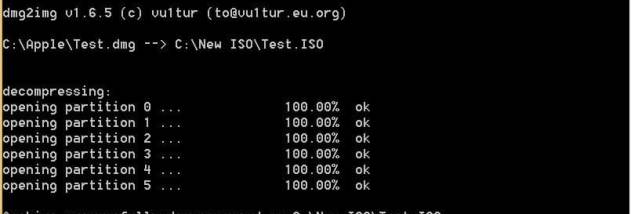

DMG2IMG is a small conversion utility for turning Apple DMG disk images into standard HFS+ image files. It is intended for users who need to work with compressed Mac disk-image archives in software that accepts a standard image rather than a DMG file. The program handles images compressed with zlib or bzip2, the formats commonly encountered in compressed DMG archives.
Conversion is performed from the command line. The user supplies an input DMG file and can optionally provide a destination IMG filename; the tool then writes the converted disk image to that location. This makes it suitable for individual conversions as well as for inclusion in simple scripts or repeatable file-processing workflows. Its command-line approach keeps the interface compact and avoids the need to navigate a graphical conversion wizard.
Optional switches provide additional control over how the conversion runs, including settings for output behavior and diagnostic or verbose messages. These can help when checking a conversion or investigating a problem with an input image. The basic operation remains straightforward: specify the source archive, choose an output path if needed, and run the command.
DMG2IMG is useful when transferring disk-image files between Mac-oriented archives and tools or systems that expect an IMG file. It converts the image format and compression handling; it is not a general archive manager, disk editor, or application installer. The resulting HFS+ image can be opened with compatible disk-image software, depending on the tools available on the system.
The utility is freeware and is derived from dmg2iso. It is a lightweight command-line program for Windows, with listed support extending through Windows 10. Because it has no graphical interface, users should be comfortable entering commands and working with file paths in a terminal. The supplied Windows compatibility information does not list Windows 11.